I'm off to a great start for this new year. By now you've seen that this year for me has started on January 5th (Monday - back to work day). So far I've already blown the "getting up at 5:00am with hubby and start working out first thing," instead I opted for sleeping in 10 minutes too late and rushing to work. I've stuck to the "let's eat healthier", but then again it's only 3:10 in the afternoon so we'll have to see if this lasts the week.
I also have stuck to the 1 hour a day set aside for me to catch up on my RSS feeds and commit to writing a posting here. Again....it's only 3:10 in the afternoon and the boss isn't in the office to interrupt. Let's see if this lasts the week.
I had great comments from Dave Ferguson in regards to my post "A New Year, A Chance to Start Fresh." He really put improvement, regardless of the task, into great perspective:
As for the coming year, one of the quotes in my collection is, "There's always room for improvement. It's the biggest room in the house." I can get dismayed or discouraged by the improvement that's always lying around, waiting to happen, but this is a reminder that there ain't no time machines. You can't go back and do things differently.
From this I take away - do not get discouraged or afraid of improvement as it will always be there, and you may as well try to improve as best you can, any change however small is good in that it will either make the situation better or teach you that it was find from the start. Every attempt at improvement is another opportunity to learn and that's really what I'm striving for this year. A HUGE INCREASE IN LEARNING. 2007 was tremendous, 2008 was okay, 2009 will be GIANORMOUS.
I came across this great post today about the trends and changes seen for 2009 or 2.009 as it was labled. I really like that so 2.009 it is, seems so trendy. E-Learning 2.009, by Eva Kaplan-Leiserson. She speaks to the likes of Tony Karrer, Anders Gronstedt, Judy Brown, David Metcalf, Anne Derryberry, and Clark Quinn. Addressed are trends and obstacles we will all face in the coming year surrounding Web 2.0 learning, Mobile Learning, and Simulations and Games. I look forward to seeing where all these land over the next year.
Here's to a prosperous 2009 everyone. Keep up the great work; together we'll continue to learn, develop, and expand our minds together..
Showing posts with label Tony Karrer. Show all posts
Showing posts with label Tony Karrer. Show all posts
Monday, 5 January 2009

Friday, 7 November 2008
eLearning Learning - Now Launched
Tony Karrer graciously asked me to participate in the launch of a new tool called eLearning Learning. I've added to my blog sidebar and you will be able to use it to see the most common terms, tools, and concepts that I blog about. Each of those links within the tool (widget) can then be break down further in to more specific content. As you follow a link you will first come to the content that was created by myself, or fed into the eLearning Learning site. As you scroll through that you will come to content created by others. If you use one of the links available to you now on the eLearning Learning site you will be able to further into the first topic link (i.e. Learning > Learning-Blogging, or Learning-Technology, etc.). The break down goes on and on.
"This is the beginning of a community portal where the community will help to collect and organize the best content from blogs and web sites. The goal is to create a place where it's relatively easy to find current content and highly relevant content surrounding eLearning." - Tony Karrer
Currently the content is mostly feed in through blogs, but will be expanded in the future.
If you want to try out the tool on some live blogs there are a few launch sites you can take a look through and play with:
Tracy Hamilton - Discovery through eLearning (mine)
Collin Kromke - Web 2.0 Work
Kevin Jones - Engaged Learning
Wendy Wickham - In The Middle of the Curve
Tony Karrer - eLearning Technology
"This is the beginning of a community portal where the community will help to collect and organize the best content from blogs and web sites. The goal is to create a place where it's relatively easy to find current content and highly relevant content surrounding eLearning." - Tony Karrer
Currently the content is mostly feed in through blogs, but will be expanded in the future.
If you want to try out the tool on some live blogs there are a few launch sites you can take a look through and play with:
Tracy Hamilton - Discovery through eLearning (mine)
Collin Kromke - Web 2.0 Work
Kevin Jones - Engaged Learning
Wendy Wickham - In The Middle of the Curve
Tony Karrer - eLearning Technology
Wednesday, 1 October 2008
Starting to be a Collector (comment from Work Literacy Ning)
Susan Neva commented today, after seeing a graph (What People are Doing) that I shared, that they would like to become more of a collector and wants to learn how to accomplish this task starting with RSS feeds.
I responded (and decided to share here) with a comment.
Week 4 of Work Literacy seems to be when we get into RSS feeds a bit more, but if you want a place to start try Google Reader. It's quite simple to use and navigate though and a great place to start collecting feeds. They don't have to be just on the topic you are interested in (ie: elearning) but can be space, news, cooking, it's endless. Word to the wise, don't collect too many or you end up not having time to read them all.
I'd start with Tony Karrer's blog, Brent Schlenker's, or mine. Tony and Brent have amazing content, but the reason I listed all three is they have great blog lists of others we follow and might be of interest to you. Tony suggested at one session to keep a feed for 30-60 days (I think) and then determine if you are getting much from the content. If it isn't of much interest to you after that, then clear it away. This way you don't end up with 1000+ rss posting a day.
Brent has just changed his reader to no feeds at all. If someone has a blog that he is following, he hopes they have now got Twitter Feeds coming from it as well and he relies on the blog headings that come through twitter. Not sure how this is working yet for him, but it's an interested way to keep up with all the info we share with one another. I use the Twitter Feeds myself through out the day to check those topics that pop up and are intriguing to me at the moment.
I responded (and decided to share here) with a comment.
Week 4 of Work Literacy seems to be when we get into RSS feeds a bit more, but if you want a place to start try Google Reader. It's quite simple to use and navigate though and a great place to start collecting feeds. They don't have to be just on the topic you are interested in (ie: elearning) but can be space, news, cooking, it's endless. Word to the wise, don't collect too many or you end up not having time to read them all.
I'd start with Tony Karrer's blog, Brent Schlenker's, or mine. Tony and Brent have amazing content, but the reason I listed all three is they have great blog lists of others we follow and might be of interest to you. Tony suggested at one session to keep a feed for 30-60 days (I think) and then determine if you are getting much from the content. If it isn't of much interest to you after that, then clear it away. This way you don't end up with 1000+ rss posting a day.
Brent has just changed his reader to no feeds at all. If someone has a blog that he is following, he hopes they have now got Twitter Feeds coming from it as well and he relies on the blog headings that come through twitter. Not sure how this is working yet for him, but it's an interested way to keep up with all the info we share with one another. I use the Twitter Feeds myself through out the day to check those topics that pop up and are intriguing to me at the moment.
Thursday, 18 September 2008
eLearning 2.0 - an Introduction to the Revolution (eLearning Guild Online Forum)
Presented by: Tony Karrer, Tech Empower, Inc.
NOTE:....check out Brent Schlenker's "Cover It Live" version of this forum.
Various 2.0 tools & use by participants in this session (110+)
Social bookmarking 43% know what it is, but....
RSS Readers 38% don't use one
Blogging - 65% Read Blogs
Wikis - 40% read wikis, 37% using a wiki
Tony shared a great example of his son looking up information on the California Gold rush. Starting with a text book and encyclopedia he found one or 2 paragraphs. Then with an internet search found a wiki entry. Then using that entry was able to find a few more terms to better search for more information. He then found a site with historical maps. Using one particular (electronic version) historical map that had text at the bottom directed specifically to miners at the time of the gold rush, he was able to discover there was a 4th route that miners used to get to California. Using this new information he went back to the wiki and entered in the new information into the wiki page. The next day someone came in and respelled a word and changed some basic formatting, but that piece of information is now still added to the wiki information page.
REMEMBER WHEN....you had to use a card catalogue and micro fiche reader to find information....lol.
Note taking.....helps thinking through the structure of what you are learning and listening to.
However, notes on paper and notes on laptops are quite different.
There are now over a trillion pages that Google is tracking and it is perhaps more important to figure out how to access it then remembering all of it.
How do we handle these challenges?
3000 new books published every day
2.7 trillion emails sent every day
175000 new blogs are created every day
New information doubles every year, 2015 it will double every week.
New information triggers an reaction that is slightly euphoric, but too many interuptions and too much information can make one feel completely overloaded and over whelmed.
We are not adapting to all this information overload very well....
(information retrieval via web - 2002)
Most people today think they are fairly adept at searching and learning.
Over time though if you don't keep up to date you slow down and lose how quickly you can.
Over 50 years old retain better phone numbers, under 30 only 40% because they use different devices to remember.
(ie: perhaps same as spell check, spelling/txting is getting worse)
(ie: ~ = approximately, Google gave up on people using this in their searches [not everyone remembers/knows what it is] and have programmed it into the background to assist in searching)
Remember Linkedin for building your networks and for looking for resources of people that know about the topic you are interested in. Great search features.
Learning and Work are inseparable for knowledge workers.
eLearning 1.0 is very formal
- needs are common
- content is known, understood, stable content,
- hits large audience
- examples - orientation, compliance, skills
eLearning 2.0 is informal, more collaborative, based on the learner
(social media tools help shift this and assist this learning)
- unique needs
Common eLearning 2.0 Scenarios
- alongside formal learning
- blogs used to answer classroom lessons with blogs
- wikis as collaborative learning tools (group projects)
- editable reference materials (wikis)
- product info
- processes
- scenarios
- faqs
- reference guides/glossary
- experience capturing
- new-hire blogs
- lab or project notebooks
- RSS readers - steady content flow inside and outside of organization
Roles of a Learning Professional in and eLearning 2.0 World
Same New
- analyst - Tool integrator/opportunity creator,
- desinger -practice leader,
- skill builder - content creator
- analyst & coach
Check out www.jingproject.com
People driving 2.0 changes
Most eLearning Guild members are reporting to the eLearning Guild that they are are the people in their organizations that understand the benefits of the 2.0 tools and are helping to drive the adoption. (least executive management)
Barriers
27% of EG members reported they can't get view YouTube, 8% can't view LinkedIn, 3% can't view wikipedia, 28% can't view Facebook
36.6% stated that their organizations are not preparing workers on using Web 2.0 approaches
Moderating Blogs
Think about perhaps uing Blog Ambassadors, or volunteers, or self-moderate by users.
NOTE:....check out Brent Schlenker's "Cover It Live" version of this forum.
Various 2.0 tools & use by participants in this session (110+)
Social bookmarking 43% know what it is, but....
RSS Readers 38% don't use one
Blogging - 65% Read Blogs
Wikis - 40% read wikis, 37% using a wiki
Tony shared a great example of his son looking up information on the California Gold rush. Starting with a text book and encyclopedia he found one or 2 paragraphs. Then with an internet search found a wiki entry. Then using that entry was able to find a few more terms to better search for more information. He then found a site with historical maps. Using one particular (electronic version) historical map that had text at the bottom directed specifically to miners at the time of the gold rush, he was able to discover there was a 4th route that miners used to get to California. Using this new information he went back to the wiki and entered in the new information into the wiki page. The next day someone came in and respelled a word and changed some basic formatting, but that piece of information is now still added to the wiki information page.
REMEMBER WHEN....you had to use a card catalogue and micro fiche reader to find information....lol.
Note taking.....helps thinking through the structure of what you are learning and listening to.
However, notes on paper and notes on laptops are quite different.
There are now over a trillion pages that Google is tracking and it is perhaps more important to figure out how to access it then remembering all of it.
How do we handle these challenges?
3000 new books published every day
2.7 trillion emails sent every day
175000 new blogs are created every day
New information doubles every year, 2015 it will double every week.
New information triggers an reaction that is slightly euphoric, but too many interuptions and too much information can make one feel completely overloaded and over whelmed.
We are not adapting to all this information overload very well....
(information retrieval via web - 2002)
Most people today think they are fairly adept at searching and learning.
Over time though if you don't keep up to date you slow down and lose how quickly you can.
Over 50 years old retain better phone numbers, under 30 only 40% because they use different devices to remember.
(ie: perhaps same as spell check, spelling/txting is getting worse)
(ie: ~ = approximately, Google gave up on people using this in their searches [not everyone remembers/knows what it is] and have programmed it into the background to assist in searching)
Remember Linkedin for building your networks and for looking for resources of people that know about the topic you are interested in. Great search features.
Learning and Work are inseparable for knowledge workers.
eLearning 1.0 is very formal
- needs are common
- content is known, understood, stable content,
- hits large audience
- examples - orientation, compliance, skills
eLearning 2.0 is informal, more collaborative, based on the learner
(social media tools help shift this and assist this learning)
- unique needs
Common eLearning 2.0 Scenarios
- alongside formal learning
- blogs used to answer classroom lessons with blogs
- wikis as collaborative learning tools (group projects)
- editable reference materials (wikis)
- product info
- processes
- scenarios
- faqs
- reference guides/glossary
- experience capturing
- new-hire blogs
- lab or project notebooks
- RSS readers - steady content flow inside and outside of organization
Roles of a Learning Professional in and eLearning 2.0 World
Same New
- analyst - Tool integrator/opportunity creator,
- desinger -practice leader,
- skill builder - content creator
- analyst & coach
Check out www.jingproject.com
People driving 2.0 changes
Most eLearning Guild members are reporting to the eLearning Guild that they are are the people in their organizations that understand the benefits of the 2.0 tools and are helping to drive the adoption. (least executive management)
Barriers
27% of EG members reported they can't get view YouTube, 8% can't view LinkedIn, 3% can't view wikipedia, 28% can't view Facebook
36.6% stated that their organizations are not preparing workers on using Web 2.0 approaches
Moderating Blogs
Think about perhaps uing Blog Ambassadors, or volunteers, or self-moderate by users.
Friday, 18 January 2008
WebStats 2007 - MEME
Tony Karrer started a meme on 2007 webstats on blogs. I started blogging mid April 2007 and began using Google Analytics in October. I certainly don't have the same number of visitors as anyone else I read, but I like to look every so often to see how my blog is received. Here are my stats from G.A. from Oct. on wards.


My stats from Blogcounter.com have me at 4647 hits since June 2007 and I've had visitors from at least 24 different countries. I love how easy blogging globally connects people.
Saturday, 8 December 2007
What is Proper Etiquette for Conversing with Another Blogger?
An interesting thought came up last night as I yet again was contacting Tony Karrer for advice and "how to's". What is the proper way to ask a question of another blogger? Many times you might see an element they have added to their page and wonder, "Just how did they do that?". Other times you may know they are an expert in a certain field and want some advice on how to proceed with your own project.
I have thought it best that if the blogger offers their email address within their profile, or better yet directly on their blog that is the "international symbol" for FEEL FREE TO EMAIL ME (with questions/comments of course). However, maybe it is better to use the comment fields that people set up at the end of their posts. I however, have not used this method when my question is of no relation to the post. I figured it would be cluttering up the bloggers post and more so taking away from the intent of the post.
A bit of the challenge though is that, my question may be of interest to many others. So how does anyone else answer it or read the answer to the question if it is only ever hidden behind the scenes in email.
Tony and I agree that neither of us mind getting emails, but also were not sure what others may think either about the whole subject. So, I've added a couple of polling questions to my blog. Hopefully you'll take a moment to answer. Perhaps we will agree as bloggers-united that if you see an email address as contact information that it is indeed the "international symbol" for "I WELCOME YOU TO CONTACT ME".
I have thought it best that if the blogger offers their email address within their profile, or better yet directly on their blog that is the "international symbol" for FEEL FREE TO EMAIL ME (with questions/comments of course). However, maybe it is better to use the comment fields that people set up at the end of their posts. I however, have not used this method when my question is of no relation to the post. I figured it would be cluttering up the bloggers post and more so taking away from the intent of the post.
A bit of the challenge though is that, my question may be of interest to many others. So how does anyone else answer it or read the answer to the question if it is only ever hidden behind the scenes in email.
Tony and I agree that neither of us mind getting emails, but also were not sure what others may think either about the whole subject. So, I've added a couple of polling questions to my blog. Hopefully you'll take a moment to answer. Perhaps we will agree as bloggers-united that if you see an email address as contact information that it is indeed the "international symbol" for "I WELCOME YOU TO CONTACT ME".
Monday, 24 September 2007
LMS Project....A Little More Progress
Well, where to start. Nothing has been happening since our last meeting in August, or so we thought. The LMS vendor has been working on there part but not quite according to the time lines we had initially set out upon. After a brief meeting today we set up weekly phone conferences between our LMS provider and the 3 project leaders (and some of their support members) here at work.
TIP 1-3 See (LMS - I don't want to be Little Miss Should've and Tony Karrer's LMS Gotchas)
TIP 4 - make sure you set up these meetings right from the beginning. Don't assume they are going to happen. This is the first way to ensure the LMS vendor is doing what they promised and that your team is doing what is expected of them to move the project forward.
We are now going to attempt to move a little more quickly then initially planned out. What does this mean? We are having several meetings (by phone) over the next few days to hammer out details of server preparation, staff database transfers and some remote training. We are going 0 to 60 without trying to go too fast. We are also aborting the idea of setting up the intranet first, then the CMS and then the LMS. We have decided to push at least the intranet and LMS forward at the same time. Amazingly enough though they (the vendor) is still convinced they can stick to the November go live date even with the several weeks of silence we've just gone through.
TIP 1-3 See (LMS - I don't want to be Little Miss Should've and Tony Karrer's LMS Gotchas)
TIP 4 - make sure you set up these meetings right from the beginning. Don't assume they are going to happen. This is the first way to ensure the LMS vendor is doing what they promised and that your team is doing what is expected of them to move the project forward.
We are now going to attempt to move a little more quickly then initially planned out. What does this mean? We are having several meetings (by phone) over the next few days to hammer out details of server preparation, staff database transfers and some remote training. We are going 0 to 60 without trying to go too fast. We are also aborting the idea of setting up the intranet first, then the CMS and then the LMS. We have decided to push at least the intranet and LMS forward at the same time. Amazingly enough though they (the vendor) is still convinced they can stick to the November go live date even with the several weeks of silence we've just gone through.
Friday, 7 September 2007
LMS - I don't want to be Little Miss Should've
"Okay, okay, okay...it's not all my fault Tony." --- I'd rather be Little Miss Splendid

Tony Karrer (eLearning Technology) posted today on his blog, 10 Gotcha's when implementing an LMS into your organization. Apparently after sharing my frustration yesterday, Tony helpped to point out that I may be experiencing #1 - Starting With an Unrealistic Expectation of What You Need, #4 - Failing to Identify Key Differentiating Use Cases, and #6 - Not Testing a LMS.
We've (my org.) have been trying to step into the LMS world since....uggg, my calendar says....2003. I'll start with Tony's #6 Gotcha. Yes, I'll admit to this one. No we didn't get hands on testing of anything and I think the reason we never asked was, we just wanted something anything, just give us the darn thing. 2003-2004 we had an IT Director that was keen on the whole project, got all the stake holders together and looked at one demo after another after another. He left, the project went stale, the money got filtered elsewhere and we lost the momentum. 2005 the new IT Director gets more push about an intranet....no...sorry....no funding, figure something else out. So, our make shift intranet is born. It's used. More and more department want a page/section on the site. Ah-ha, now he has some leverage to find funding and begin the ball rolling again. However, we are going to make sure we get an all in one package from someone that includes and intranet, doc management and LMS. After a billion more demos, some the same from the first round, we narrow it down to two vendors. I will share here as well that during one point of all this searching around there were issues with trying to make sure we were doing what other hospitals in the area/affiliates were doing. It would have helped with pricing, sharing, hosting, etc., but again we were sick of waiting and went and begun our own project. With the two vendors chosen, we invited every stakeholder we could think of (maybe too many) and armed with a series of must-haves we evaluated them again through demos (and referenced other hospitals using the products) and put it to a vote. Again, I'll add here.... we finally had the funding approved, we just wanted one, any one, get it going. So....no there was no hands on testing. (FAIL - perhaps, time will tell regarding our product and our satisfaction, but this was definitely an oversight.)
Gotcha #1...Unrealistic Expectation....okay maybe, this is a definite we'll see. I don't think we are aiming too high here. We know it's going to be a real challenge to get our staff to start using and embracing the system. I really would just love something that is going to track our staff education (outside the organization), something to help with booking the internal courses, and something to launch and better yet marked the annoying core curriculum (still marking the paper ones from June). (PASS - but barely, I think are expectations are okay, but listening and believing the implementation time line was very, very silly.)
Gotcha #4 - Failing to Identify Key Differentiating Use Cases...I'm going to admit here....I'm not sure what this one means. I'm going to need some help clarifying this mistake.
I will be very interested to see if any of the other Gotchas show up during this project. I'm keeping track now.
Tony Karrer (eLearning Technology) posted today on his blog, 10 Gotcha's when implementing an LMS into your organization. Apparently after sharing my frustration yesterday, Tony helpped to point out that I may be experiencing #1 - Starting With an Unrealistic Expectation of What You Need, #4 - Failing to Identify Key Differentiating Use Cases, and #6 - Not Testing a LMS.
We've (my org.) have been trying to step into the LMS world since....uggg, my calendar says....2003. I'll start with Tony's #6 Gotcha. Yes, I'll admit to this one. No we didn't get hands on testing of anything and I think the reason we never asked was, we just wanted something anything, just give us the darn thing. 2003-2004 we had an IT Director that was keen on the whole project, got all the stake holders together and looked at one demo after another after another. He left, the project went stale, the money got filtered elsewhere and we lost the momentum. 2005 the new IT Director gets more push about an intranet....no...sorry....no funding, figure something else out. So, our make shift intranet is born. It's used. More and more department want a page/section on the site. Ah-ha, now he has some leverage to find funding and begin the ball rolling again. However, we are going to make sure we get an all in one package from someone that includes and intranet, doc management and LMS. After a billion more demos, some the same from the first round, we narrow it down to two vendors. I will share here as well that during one point of all this searching around there were issues with trying to make sure we were doing what other hospitals in the area/affiliates were doing. It would have helped with pricing, sharing, hosting, etc., but again we were sick of waiting and went and begun our own project. With the two vendors chosen, we invited every stakeholder we could think of (maybe too many) and armed with a series of must-haves we evaluated them again through demos (and referenced other hospitals using the products) and put it to a vote. Again, I'll add here.... we finally had the funding approved, we just wanted one, any one, get it going. So....no there was no hands on testing. (FAIL - perhaps, time will tell regarding our product and our satisfaction, but this was definitely an oversight.)
Gotcha #1...Unrealistic Expectation....okay maybe, this is a definite we'll see. I don't think we are aiming too high here. We know it's going to be a real challenge to get our staff to start using and embracing the system. I really would just love something that is going to track our staff education (outside the organization), something to help with booking the internal courses, and something to launch and better yet marked the annoying core curriculum (still marking the paper ones from June). (PASS - but barely, I think are expectations are okay, but listening and believing the implementation time line was very, very silly.)
Gotcha #4 - Failing to Identify Key Differentiating Use Cases...I'm going to admit here....I'm not sure what this one means. I'm going to need some help clarifying this mistake.
I will be very interested to see if any of the other Gotchas show up during this project. I'm keeping track now.
Thursday, 6 September 2007
Welcome to the Wonderful World of Blogging - (my name in print)
Tony Karrer has an article published in this month's T+D (Training and Development) magazine (click the magazine cover to launch the reader). His article is based on blogging, but more specifically the learning and networking benefits that can come from starting your own.
I was honoured earlier in the summer when Tony asked me for my perspective on blogging. Now to see it in print; well I'm giddy with excitement. It's a great article with other perspectives from Karyn Romeis, Jay Cross, Wendy Wickham, and Brent Schlenker.
This is a bit of a tangent from the idea of blogging, but....I love the technology it takes to reading a magazine like this online. It's really cool (yes, my name is Tracy and I'm a techno-geek, "Hi Tracy"). It's a great method to get, traditionally, boomers to read printed material online. Being able to see the pages, go to the table of contents, flip through pages back and forth, and zoom in and out (picture your dad holding the newspaper at arm's length). I can not get my colleagues (boomers...sorry but it's true) to read anything online; I've got to print it out for them if I want them to read something. It makes the online reading experience more interactive and more like real life.
However, back to the article....
Some of the ideas and quotes from it that really struck for me are:
I was honoured earlier in the summer when Tony asked me for my perspective on blogging. Now to see it in print; well I'm giddy with excitement. It's a great article with other perspectives from Karyn Romeis, Jay Cross, Wendy Wickham, and Brent Schlenker.
This is a bit of a tangent from the idea of blogging, but....I love the technology it takes to reading a magazine like this online. It's really cool (yes, my name is Tracy and I'm a techno-geek, "Hi Tracy"). It's a great method to get, traditionally, boomers to read printed material online. Being able to see the pages, go to the table of contents, flip through pages back and forth, and zoom in and out (picture your dad holding the newspaper at arm's length). I can not get my colleagues (boomers...sorry but it's true) to read anything online; I've got to print it out for them if I want them to read something. It makes the online reading experience more interactive and more like real life.
However, back to the article....
Some of the ideas and quotes from it that really struck for me are:
"Bloggers continually search for interesting information they can post. When they post information, they must synthesize that information, formulate additional questions, contrast and make sense of differing viewpoints, and identify patterns and trends." - Tony Karrer
I learn something new every day.
"The one thing I have really notice and experienced about the blogging community is that everyone is extremely friendly, open, and willing to share ideas and mentor one another." - Tracy Hamilton
I learn something new from my online mentors."If for no other reason than your job is changing, and you might want to be engaged in the process of what your new job will include." - Brent Schlenker
I'm tracking my progress.
The starting point...is to learn how to use blogs as individual work and learning tools and then become evangelists about these technologies, methods, and habits." - Tony Karrer
I'm tracking my development, sharing my experiences, and hopefully teaching and mentoring others.
Monday, 9 July 2007
What can Britney Spears Teach You About Blogging? - You'd be surprised
Ok, the elearning world in terms of my own personal experiences is a little slow at the moment. The LMS contract is still not signed, so I have nothing to play with. The elearning courses I am taking are on hiatus for the summer, so I have nothing to complain about (and I did pass with flying colours the last course, of which some assigments I posted on here in June and complained about). So for now I shall share some of my stumblings that I come across.
After reading Tony Karrer's quest for explaining the "power of blogging," I then came across Matt Huggins' 55 Essential Articles Every Serious Blogger Should Read and within that 6 Lessons Britney Spears Can Teach You About Blogging. It's actually a very informative article. I'll summarize the points here and you and read the expanded post if you are intrigued too:
After reading Tony Karrer's quest for explaining the "power of blogging," I then came across Matt Huggins' 55 Essential Articles Every Serious Blogger Should Read and within that 6 Lessons Britney Spears Can Teach You About Blogging. It's actually a very informative article. I'll summarize the points here and you and read the expanded post if you are intrigued too:
- Be bold. Be unique. Be different.
- Look after your baby
- Keep good relationships
- Be careful who you associate with
- Keep your site looking good
- Always wear underwear
Hey, it's fun for a Monday.
Thursday, 28 June 2007
Idea for Virtual Conferences - Better? Maybe.
Tony Karrer had a post mid month regarding ideas for creating better and more engaging conferences. I added a couple of thoughts, but then came across this today...what about just virtual conferences. You never need to leave your office, home, bedroom.
Computer scientists at the University of Alberta along with HP in California are working on developing a holodeck. Yes, you read that right. Just like in Star Trek. They are trying to create a 3D virtual reality superior to video conferencing, whereby participants will be able to interact with one another, perhaps even on a virtual product, within the "room".
CBCNews reports they anticipate the technology "will be so realistic users will be able to see an eye twitch or a bead of sweat — important non-verbal cues people often rely on when making business decisions."
http://www.cbc.ca/canada/edmonton/story/2007/06/28/holodeck-tech.html?ref=rss
Computer scientists at the University of Alberta along with HP in California are working on developing a holodeck. Yes, you read that right. Just like in Star Trek. They are trying to create a 3D virtual reality superior to video conferencing, whereby participants will be able to interact with one another, perhaps even on a virtual product, within the "room".
CBCNews reports they anticipate the technology "will be so realistic users will be able to see an eye twitch or a bead of sweat — important non-verbal cues people often rely on when making business decisions."
http://www.cbc.ca/canada/edmonton/story/2007/06/28/holodeck-tech.html?ref=rss
Wednesday, 27 June 2007
Generating Excitement for using Web 2.0 Tools
I started commenting on Angela White's blog, but realized I was writing a little more then just a comment, so I'll put my response here.
Angela was commenting today (Trying… to… nudge… the… Wiki… along…) on the difficulties of putting all the time and energy into laying out a wiki for her organization to use, but then what? Do they ever look at it? Do they contribute to it? Do they even care about it? And if not.....HOW DO WE MAKE THEM?!?!?
I've been struggling with these questions myself. It's great and disheartening to hear someone else going through the same experiences. Here we are as designers, developers, trainers, etc. excited about the possibilities offered from some of these Web 2.0 apps, but trying to get the co-workers who are still baffled by email to even look at them is challenging.
After my "successful" wiki attempt last week, I put that in quotes because yes it did get input and some did jump in and really enjoy the new format, I heard someone today say they were afraid to use it. "What if someone changes what I write in?" "I was afraid I would mess it up." "What if someone knew it was me that put in that comment?"
I'm lost in this process as well. As Angela pointed out from Tony Karrer's piece today "Leading a Horse to a Fire Hose" just because we think it is important and point them to it weekly, daily, hourly, should we expect them to see as we do, the significant relevance of the tool or information. If we do expect them to "drink" up the information then as Angela ask how do we get them to buy in to the concept.
I'll be interested to see if she does try the "this is the only option" method. Sounds good...a little dictatorshipish (word?) but a solid idea. I'm not sure if my initial method was a good idea either...starting small with a one page wiki. Get the potential users to submit ideas on a wiki for the next Staff Appreciation Day, or New Ideas for the Cafeteria Menu, or the Best Route to Get to Work. Get them use to the idea of what a wiki is, does and can deliver.
Get them excited or at least use to the concept and move them on to something a little larger. I actually had our CNO come to me today saying how excited she was to go to a conference yesterday with other CNO and suggest they use a wiki for something. You should have seen her beam with pride when she told me "I was the only one in the room that knew what a wiki was and I explained how we could use it." Ahhh does my little training heart good.
I'm excited to see where Angela and I get in a year from now with our Wikis. Maybe you'll see us co-presenting at an eLearning Guild conference on "Getting Your Staff to Use Their Wikis".
Angela was commenting today (Trying… to… nudge… the… Wiki… along…) on the difficulties of putting all the time and energy into laying out a wiki for her organization to use, but then what? Do they ever look at it? Do they contribute to it? Do they even care about it? And if not.....HOW DO WE MAKE THEM?!?!?
I've been struggling with these questions myself. It's great and disheartening to hear someone else going through the same experiences. Here we are as designers, developers, trainers, etc. excited about the possibilities offered from some of these Web 2.0 apps, but trying to get the co-workers who are still baffled by email to even look at them is challenging.
After my "successful" wiki attempt last week, I put that in quotes because yes it did get input and some did jump in and really enjoy the new format, I heard someone today say they were afraid to use it. "What if someone changes what I write in?" "I was afraid I would mess it up." "What if someone knew it was me that put in that comment?"
I'm lost in this process as well. As Angela pointed out from Tony Karrer's piece today "Leading a Horse to a Fire Hose" just because we think it is important and point them to it weekly, daily, hourly, should we expect them to see as we do, the significant relevance of the tool or information. If we do expect them to "drink" up the information then as Angela ask how do we get them to buy in to the concept.
I'll be interested to see if she does try the "this is the only option" method. Sounds good...a little dictatorshipish (word?) but a solid idea. I'm not sure if my initial method was a good idea either...starting small with a one page wiki. Get the potential users to submit ideas on a wiki for the next Staff Appreciation Day, or New Ideas for the Cafeteria Menu, or the Best Route to Get to Work. Get them use to the idea of what a wiki is, does and can deliver.
Get them excited or at least use to the concept and move them on to something a little larger. I actually had our CNO come to me today saying how excited she was to go to a conference yesterday with other CNO and suggest they use a wiki for something. You should have seen her beam with pride when she told me "I was the only one in the room that knew what a wiki was and I explained how we could use it." Ahhh does my little training heart good.
I'm excited to see where Angela and I get in a year from now with our Wikis. Maybe you'll see us co-presenting at an eLearning Guild conference on "Getting Your Staff to Use Their Wikis".
Thursday, 14 June 2007
Another initiative, more work, more learning, and then more revisions
I did a presentation at the beginning of June for a network group that I belong to. The presentation was introducing my colleagues to the world of blogs, wikis, rss, collaborative spaces, booking marking, etc. Using my new found knowledge from various online & Guild presentations (Brent, Tony, Keith, Lee) I delivered the information flawlessly. Well maybe not, I did go over my allotted time. However, my presentation was so clear that when I summarized which particular egroup platform would best meet our needs (Yahoo! Groups) there was no discussion. Just a resounding, MAKE IT HAPPEN.
And so I have. The site is up and ready to use.
Initiative done.
Wait now I have to develop some kind of learning material to teach my colleagues what the site can do, how they can do it on their own and wait for it.....make the learning materials exciting.
So, I start. I capture my screen shots, put my arrows in, animate this, that and those. Step back and admire all my work. Then....I....let my boss....try it. Actually it went not bad, but there were a few slight tweaks to make it better.
And then.....I participated in another eLearning Guild Online Forum today regarding how to utilize PowerPoint to the extreme. I know so many of you hate, maybe that is too strong a word - despise, PowerPoint. For now though it's all I have to work with.
20 minutes into the opening keynote presentation I realize all the work I just did on my learning package was awful. Too many bullet points, screens filled with text, little interaction, no fun at all. Sure it pointed out everything that a new user could want, but did I really need to explain EVERYTHING.
So, that being said I've gone back to the drawing board and am so much happier with the product. It's not finished mind you, but will be by the end of tomorrow. A quick flash by my boss..."Oh you're too hard on yourself," she says, "Wow, that's the new version. Excellent."
Well, time will tell as I roll it out (hopefully) tomorrow to the entire network. Let's see what 100+ new users think of it all.
And so I have. The site is up and ready to use.
Initiative done.
Wait now I have to develop some kind of learning material to teach my colleagues what the site can do, how they can do it on their own and wait for it.....make the learning materials exciting.
So, I start. I capture my screen shots, put my arrows in, animate this, that and those. Step back and admire all my work. Then....I....let my boss....try it. Actually it went not bad, but there were a few slight tweaks to make it better.
And then.....I participated in another eLearning Guild Online Forum today regarding how to utilize PowerPoint to the extreme. I know so many of you hate, maybe that is too strong a word - despise, PowerPoint. For now though it's all I have to work with.
20 minutes into the opening keynote presentation I realize all the work I just did on my learning package was awful. Too many bullet points, screens filled with text, little interaction, no fun at all. Sure it pointed out everything that a new user could want, but did I really need to explain EVERYTHING.
So, that being said I've gone back to the drawing board and am so much happier with the product. It's not finished mind you, but will be by the end of tomorrow. A quick flash by my boss..."Oh you're too hard on yourself," she says, "Wow, that's the new version. Excellent."
Well, time will tell as I roll it out (hopefully) tomorrow to the entire network. Let's see what 100+ new users think of it all.
Monday, 11 June 2007
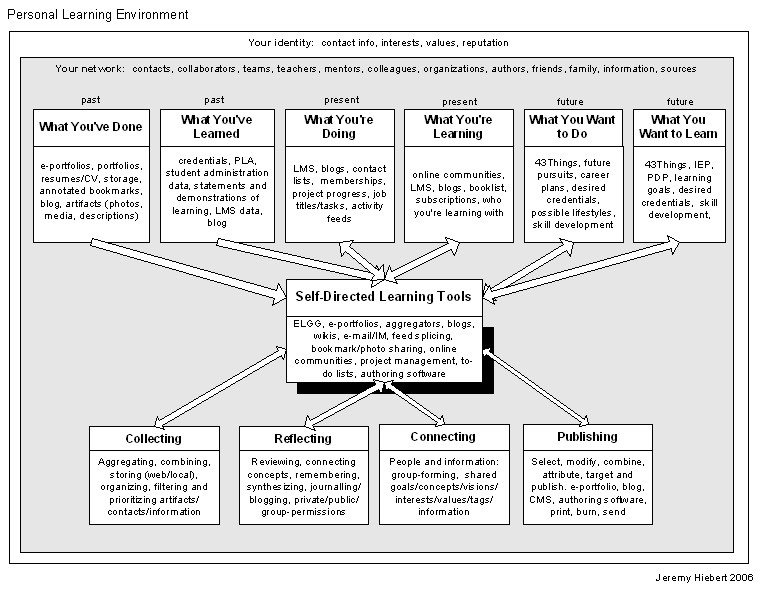
What is a PLE?
In the last few days there has been lots of posts flying around about PLEs. Some of the subject matter has reflected on whether the content of PLEs including blogs is actually the intellectual property of a company....that is if you are blogging on company time. With that in mind did the P even stand for Personal?
Okay, so I read all these posts and I think I get it all, but maybe not. I need to rewind and try to find some info on what the heck a PLE really is. Then I find I need to know what a PKM is and some kind of new whale species called (I joke, I kind of like the sound of it) a p-Whale (PWLE).
So PKM (Personal Knowledge Management) I found nicely from Knowledgeboard via Tony Karrer as:
A PWLE (Personal Work and Learning Environment) (pronounced p-Whale, a tentative term from Tony, but is cool, catchy and will probably stick) I also found on Tony's blog.
orking backwards to my original question what really is a PLE? I've got the general idea that it currently seems to be more of a concept then one simple thing. It is different for different people and is a collection of learning pieces, tools and experiences. Anything that assists or furthers you in learning is actually a part of your PLE. There doesn't seem to be one particular tool or formula that would be right for every person.
I found a diagram by Jeremy Hiebert that "works" for me in helping to visualize the whole idea. It's from Feb. 2006, so maybe there is something better that I haven't stumbled on yet.
It's really interesting to see a concept/tool being discussed and developed. I've never experienced anything like this and to read around through various posts discussing the notion is fascinating. One person comes up with one idea, another gives it a name, someone else draws a diagram. I'm excited to see where the topic will be in a year from now.
If I've misunderstood the terms I'd love to be corrected or pointed in a better direction (even if that is 1.0 of me).
Okay, so I read all these posts and I think I get it all, but maybe not. I need to rewind and try to find some info on what the heck a PLE really is. Then I find I need to know what a PKM is and some kind of new whale species called (I joke, I kind of like the sound of it) a p-Whale (PWLE).
So PKM (Personal Knowledge Management) I found nicely from Knowledgeboard via Tony Karrer as:
"PKM is a conceptual framework to organize and integrate information that we, as individuals, feel is important so that it becomes part of our personal knowledge base. It provides a strategy for transforming what might be random pieces of(Look I finally figured out how to create a block quote...neat)
information into something that can be systematically applied and that expands our personal knowledge."
A PWLE (Personal Work and Learning Environment) (pronounced p-Whale, a tentative term from Tony, but is cool, catchy and will probably stick) I also found on Tony's blog.
orking backwards to my original question what really is a PLE? I've got the general idea that it currently seems to be more of a concept then one simple thing. It is different for different people and is a collection of learning pieces, tools and experiences. Anything that assists or furthers you in learning is actually a part of your PLE. There doesn't seem to be one particular tool or formula that would be right for every person.
I found a diagram by Jeremy Hiebert that "works" for me in helping to visualize the whole idea. It's from Feb. 2006, so maybe there is something better that I haven't stumbled on yet.
It's really interesting to see a concept/tool being discussed and developed. I've never experienced anything like this and to read around through various posts discussing the notion is fascinating. One person comes up with one idea, another gives it a name, someone else draws a diagram. I'm excited to see where the topic will be in a year from now.
If I've misunderstood the terms I'd love to be corrected or pointed in a better direction (even if that is 1.0 of me).
Tuesday, 15 May 2007
Relating Valuable Experiences through Social Book Marking
Personal Learning for Learning Professionals - Using Web 2.0 Tools to Make Reading & Research More Effective : eLearning Technology
A recent quoted added to a discussion thread in my online course mentioned “Van Manen (2003, p.53) says “When someone has related a valuable experience to me then I have indeed gained something, even though the [thing] gained is not an identifiable entity”. Educators and aspiring ones can be authorities who speak of their own experiences in e-learning and e-teaching.”
This thought tweaked in me the idea of social book marking. This concept allows a user to bookmark any site they find on the internet whether it is a website, recipe, etext, music, etc. and store it online. By storing it online you can have access to your bookmarks from any computer that has an internet connection. It also allows you to add tags to your saved book marks. Tags are short identifiable words that you assign to the book mark so that you can find it quickly later. An example of this is, if you stored a website on how to bake a lemon pie, you may uses tags such as recipe, lemon, pie. As you accumulate book marks you may begin to store more and more under one particular tag (i.e. recipe). Also when you book mark a site you can also see how many other users (of a particular social book marking site) have also book marked that site for its relevance. In this respect you are telling one another “Here is a site about xxxx that I found extremely interesting and informative and I think others should look at it as well.”
If several users collaborate and use the same tag identifier then they will all be able to share and resource the same pages. These booking marking sites also allow you to do searches on their home page regarding a particular topic. In this respect as one user finds a page/experience that they have found invaluable then this e-tool becomes an extremely valuable tool as a method for sharing those experiences with other learners and facilitators.
Notes: Extra information on this topic can be found through Tony Karrer’s blog eLearning Technology, and through the del.icio.us website.
References
http://del.icio.us/ Yahoo! Inc., Sunnyvale, California.
Karrer, Tony. Tags: Social, Bookmarks, eLearning Technology. Los Angeles, California Retrieved May 15, 2007 from http://elearningtech.blogspot.com/search?q=social+bookmarks
Van Manen, M. (2003). Researching Lived Experience. Human Science for an Action Sensitive Pedagogy. Ontario: Althouse Press
A recent quoted added to a discussion thread in my online course mentioned “Van Manen (2003, p.53) says “When someone has related a valuable experience to me then I have indeed gained something, even though the [thing] gained is not an identifiable entity”. Educators and aspiring ones can be authorities who speak of their own experiences in e-learning and e-teaching.”
This thought tweaked in me the idea of social book marking. This concept allows a user to bookmark any site they find on the internet whether it is a website, recipe, etext, music, etc. and store it online. By storing it online you can have access to your bookmarks from any computer that has an internet connection. It also allows you to add tags to your saved book marks. Tags are short identifiable words that you assign to the book mark so that you can find it quickly later. An example of this is, if you stored a website on how to bake a lemon pie, you may uses tags such as recipe, lemon, pie. As you accumulate book marks you may begin to store more and more under one particular tag (i.e. recipe). Also when you book mark a site you can also see how many other users (of a particular social book marking site) have also book marked that site for its relevance. In this respect you are telling one another “Here is a site about xxxx that I found extremely interesting and informative and I think others should look at it as well.”
If several users collaborate and use the same tag identifier then they will all be able to share and resource the same pages. These booking marking sites also allow you to do searches on their home page regarding a particular topic. In this respect as one user finds a page/experience that they have found invaluable then this e-tool becomes an extremely valuable tool as a method for sharing those experiences with other learners and facilitators.
Notes: Extra information on this topic can be found through Tony Karrer’s blog eLearning Technology, and through the del.icio.us website.
References
http://del.icio.us/ Yahoo! Inc., Sunnyvale, California.
Karrer, Tony. Tags: Social, Bookmarks, eLearning Technology. Los Angeles, California Retrieved May 15, 2007 from http://elearningtech.blogspot.com/search?q=social+bookmarks
Van Manen, M. (2003). Researching Lived Experience. Human Science for an Action Sensitive Pedagogy. Ontario: Althouse Press
Subscribe to:
Posts (Atom)






 Posts
Posts