After reading an article on e-Clippings about IBM and all the technology that their staff is using, I just had to share the data with my supervisor. Immediately our minds race with how can we generate that kind of buy-in and use from our employees. Then I often snap back to reality (and rather abruptly too) that I'm in the heathcare industry and does that mean something different for our staff?
Of our 2500+ staff, only 500 currently have inhouse email (that has got to change!). Of that 500 staff not all of them are at or near a computer every day. Perhaps only 300 are actual desk-jockeys. As Angela White queried early this week...how do I get any of them involved in this technology movement? How do I get excited to use it or even look at it? But then even more stumbling of a thought, do healthcare workers need it (I think so) or do they even have any time to look at it?
I'm become concerned that perhaps I am thinking too corporately with many of the ideas floating in my head that I would like to work on and develop. Perhaps I need to find an entire new model to go after. One that is certainly more geared to the staff member that will only be at a mobile unit or after hours at home. Then one more question develops...after a 12 hours shift how to you get someone to go home and elearn, read the daily news of the organization, blog, wiki, anything.
Maybe my focus should only be on the 300 with computers. Maybe the other 2200 just get left behind, but of course that too seems unreasonable.
What an awful series of questions to post to myself before a long weekend.
Friday, 29 June 2007

My Shared Items - Worth Looking at Too
Some postings I read are just so interesting that I don't want to summarize the author, but I do want to remember them and share them with others. So to do this I tag them as "share" through my Google Reader.
They are set up as links down the right side of my blog and are worth taking a look through every so often to see what has been added.
One that I really liked today was regarding stats from IBM and the staggering totals of how many employees have blogs, and how many wikis the company has (20,000).
The other that piqued my interest to look at later when developing courses was the possibilities that Passively Multiplayer Online Games offered to engaging students in online information quests.
They are set up as links down the right side of my blog and are worth taking a look through every so often to see what has been added.
One that I really liked today was regarding stats from IBM and the staggering totals of how many employees have blogs, and how many wikis the company has (20,000).
The other that piqued my interest to look at later when developing courses was the possibilities that Passively Multiplayer Online Games offered to engaging students in online information quests.
These aren't your typical Martha type crafts
Skimming around some posts today I came across one about your own personal office cubicle garden. Hmmm, lovely sunny day...I'd rather be outside...sure why not bring the outdoors in...and so I ventured off to the site.
Much to my delight I spent far too much time looking through lots and lots of great ideas of easy to make crafts. When I say crafts I'm not talking about scrap booking or needlepoint.
I found one on creating a trebuchet out of office supplies (handy for when your boss asks you to stay for a few extra hours on a Friday). A trendy invisible bookshelf. Even some how-to ideas such as getting the most out of your keyboard when using Windows.
Some are really interesting and practical. Some seem down right dangerous - see the section entitled Not Liable.
Certainly for the upcoming holidays in Canada and the USA, why not take at look at Instructables: Step-by-step Instructions and find something fun for the whole family to do. Just in case you have no means to travel anywhere during the holidays, you can always make yourself a jet plane.
Much to my delight I spent far too much time looking through lots and lots of great ideas of easy to make crafts. When I say crafts I'm not talking about scrap booking or needlepoint.
I found one on creating a trebuchet out of office supplies (handy for when your boss asks you to stay for a few extra hours on a Friday). A trendy invisible bookshelf. Even some how-to ideas such as getting the most out of your keyboard when using Windows.
Some are really interesting and practical. Some seem down right dangerous - see the section entitled Not Liable.
Certainly for the upcoming holidays in Canada and the USA, why not take at look at Instructables: Step-by-step Instructions and find something fun for the whole family to do. Just in case you have no means to travel anywhere during the holidays, you can always make yourself a jet plane.
Thursday, 28 June 2007
Idea for Virtual Conferences - Better? Maybe.
Tony Karrer had a post mid month regarding ideas for creating better and more engaging conferences. I added a couple of thoughts, but then came across this today...what about just virtual conferences. You never need to leave your office, home, bedroom.
Computer scientists at the University of Alberta along with HP in California are working on developing a holodeck. Yes, you read that right. Just like in Star Trek. They are trying to create a 3D virtual reality superior to video conferencing, whereby participants will be able to interact with one another, perhaps even on a virtual product, within the "room".
CBCNews reports they anticipate the technology "will be so realistic users will be able to see an eye twitch or a bead of sweat — important non-verbal cues people often rely on when making business decisions."
http://www.cbc.ca/canada/edmonton/story/2007/06/28/holodeck-tech.html?ref=rss
Computer scientists at the University of Alberta along with HP in California are working on developing a holodeck. Yes, you read that right. Just like in Star Trek. They are trying to create a 3D virtual reality superior to video conferencing, whereby participants will be able to interact with one another, perhaps even on a virtual product, within the "room".
CBCNews reports they anticipate the technology "will be so realistic users will be able to see an eye twitch or a bead of sweat — important non-verbal cues people often rely on when making business decisions."
http://www.cbc.ca/canada/edmonton/story/2007/06/28/holodeck-tech.html?ref=rss
New Colours - Keeping it Fresh
Just in case you happened to notice...yes the colours on my page have been changed. I tend to do this every so often. One, because it keeps it fresh (maybe only to myself) without changing the content and layout. Two, it is kind of fun to play around with your layout and code (hmmm, maybe that sounds a little nerdy). Three, it gives me something to do while I avoid marking tests by hand.
Oh please let me have an LMS soon.
Oh please let me have an LMS soon.
Social Networks in Plain English - CommonCraft Creates another great Show
Here's another wonderful production from Lee Lefever and The Common Craft Show team. This one is a small production on Social Networks in Plain English and is yet again anothe simple and straight forward presentation that everyone can easily understand.
I also really liked Lee's recent post on Why Paperworks: All About Constraints. In it he explains why he and his team have chosen to use paper, whiteboards, and just hands to create these simple yet very imformative pieces.
Lee's answer to why just these tools?
"By narrowing the scope of possibilities down to only a few ways to present
ideas, we can eliminate needless decision making and complexity."Materials: ...Our materials, while limited, keep us lightweight and simple.
Time: By limiting the video's possible lengthto 4 minutes, we limit ourselves to major points. We don't sweat the small stuff.
Hands: By using only our hands, we don't have to think about clothes, hair, make-up or even facial expressions.
Music: By not using external music, we don't have to pick the right song or worry about being sued.
The Lesson: ...By eliminating the decisions about technology, presentation, music, etc. we have time to focus on the core of what makes Paperworks work: the ideas.
Briliant and one of those "why didn't I think of it" concepts. I've found the entire site is full of wonderful tidbits and lessons that are great for us "users" to forward on to "newbies" to help them understand more easily many of the tools we just seem to look at and immediately know how to use.
Wednesday, 27 June 2007
Generating Excitement for using Web 2.0 Tools
I started commenting on Angela White's blog, but realized I was writing a little more then just a comment, so I'll put my response here.
Angela was commenting today (Trying… to… nudge… the… Wiki… along…) on the difficulties of putting all the time and energy into laying out a wiki for her organization to use, but then what? Do they ever look at it? Do they contribute to it? Do they even care about it? And if not.....HOW DO WE MAKE THEM?!?!?
I've been struggling with these questions myself. It's great and disheartening to hear someone else going through the same experiences. Here we are as designers, developers, trainers, etc. excited about the possibilities offered from some of these Web 2.0 apps, but trying to get the co-workers who are still baffled by email to even look at them is challenging.
After my "successful" wiki attempt last week, I put that in quotes because yes it did get input and some did jump in and really enjoy the new format, I heard someone today say they were afraid to use it. "What if someone changes what I write in?" "I was afraid I would mess it up." "What if someone knew it was me that put in that comment?"
I'm lost in this process as well. As Angela pointed out from Tony Karrer's piece today "Leading a Horse to a Fire Hose" just because we think it is important and point them to it weekly, daily, hourly, should we expect them to see as we do, the significant relevance of the tool or information. If we do expect them to "drink" up the information then as Angela ask how do we get them to buy in to the concept.
I'll be interested to see if she does try the "this is the only option" method. Sounds good...a little dictatorshipish (word?) but a solid idea. I'm not sure if my initial method was a good idea either...starting small with a one page wiki. Get the potential users to submit ideas on a wiki for the next Staff Appreciation Day, or New Ideas for the Cafeteria Menu, or the Best Route to Get to Work. Get them use to the idea of what a wiki is, does and can deliver.
Get them excited or at least use to the concept and move them on to something a little larger. I actually had our CNO come to me today saying how excited she was to go to a conference yesterday with other CNO and suggest they use a wiki for something. You should have seen her beam with pride when she told me "I was the only one in the room that knew what a wiki was and I explained how we could use it." Ahhh does my little training heart good.
I'm excited to see where Angela and I get in a year from now with our Wikis. Maybe you'll see us co-presenting at an eLearning Guild conference on "Getting Your Staff to Use Their Wikis".
Angela was commenting today (Trying… to… nudge… the… Wiki… along…) on the difficulties of putting all the time and energy into laying out a wiki for her organization to use, but then what? Do they ever look at it? Do they contribute to it? Do they even care about it? And if not.....HOW DO WE MAKE THEM?!?!?
I've been struggling with these questions myself. It's great and disheartening to hear someone else going through the same experiences. Here we are as designers, developers, trainers, etc. excited about the possibilities offered from some of these Web 2.0 apps, but trying to get the co-workers who are still baffled by email to even look at them is challenging.
After my "successful" wiki attempt last week, I put that in quotes because yes it did get input and some did jump in and really enjoy the new format, I heard someone today say they were afraid to use it. "What if someone changes what I write in?" "I was afraid I would mess it up." "What if someone knew it was me that put in that comment?"
I'm lost in this process as well. As Angela pointed out from Tony Karrer's piece today "Leading a Horse to a Fire Hose" just because we think it is important and point them to it weekly, daily, hourly, should we expect them to see as we do, the significant relevance of the tool or information. If we do expect them to "drink" up the information then as Angela ask how do we get them to buy in to the concept.
I'll be interested to see if she does try the "this is the only option" method. Sounds good...a little dictatorshipish (word?) but a solid idea. I'm not sure if my initial method was a good idea either...starting small with a one page wiki. Get the potential users to submit ideas on a wiki for the next Staff Appreciation Day, or New Ideas for the Cafeteria Menu, or the Best Route to Get to Work. Get them use to the idea of what a wiki is, does and can deliver.
Get them excited or at least use to the concept and move them on to something a little larger. I actually had our CNO come to me today saying how excited she was to go to a conference yesterday with other CNO and suggest they use a wiki for something. You should have seen her beam with pride when she told me "I was the only one in the room that knew what a wiki was and I explained how we could use it." Ahhh does my little training heart good.
I'm excited to see where Angela and I get in a year from now with our Wikis. Maybe you'll see us co-presenting at an eLearning Guild conference on "Getting Your Staff to Use Their Wikis".
Mobile Knowledge for Social Change
A great new (or recently new) wiki was passed on to me today for collecting ides on how to use mobile technology, elearning, communications to better the global community. It is fairly new in that not a lot of additions have been created on the wiki, but there is great room for growth an opportunity for those of us using and exploring this means to educating. Several of the current editions to the wiki include health care applications. There are items on communications in rural areas, mobile banking, and environmental conservation.
At the least take a look and maybe it will intrigue you to sign up to the community. Your contributions could greatly help out others in the field.
At the least take a look and maybe it will intrigue you to sign up to the community. Your contributions could greatly help out others in the field.
ShareIdeas.org is an online community and a wiki for sharing ideas on how to use mobile communications for social and environmental benefits. ShareIdeas.org was created with support from Nokia and Vodafone, but belongs to the growing global network of individuals and organizations that use this virtual gathering place to
communicate - and collaborate.
The idea for ShareIdeas.org came from Ndidi Nwuneli, founder and CEO of LEAP Africa, a Nigerian NGO dedicated to nurturing a new generation of African leaders.
"Groups like ours would really benefit from a resource that shows us how to use mobile technology to carry out our work more effectively," said Ndidi at a Nokia stakeholder event of NGO and corporate leaders. ShareIdeas.org was created in response to Ndidi’s request.
Monday, 25 June 2007
Is Facebook a Class above MySpace?
The BBC reports on a study from PhD student Danah Boyd from the School of Information Sciences at UC Berkeley that:
I'm not really surprised to find that teens tend to do what their friends do. Adults do it as well. We're each doing this now as we read one blog advocating an idea or tool. "Hey if Yada Yada says it's good then it must be." Or at least I'll check it out. The fact that users can be generally characterized to use one network over another; yeah that was a bit of a stumper.
Broadly, Ms Boyd found Facebook users tend to be white and come from families
who are keen for children to get the most out of school and go on to college.
Characterising Facebook users she said: "They are in honors classes, looking
forward to the prom, and live in a world dictated by after school
activities."
"By contrast, the average MySpace teenager tended to come from
families where parents did not go to college, she said. Ms Boyd also found far
more teens from immigrant, Latino and Hispanic families on MySpace as well as
many others who are not part of the "dominant high school popularity paradigm".
I'm not really surprised to find that teens tend to do what their friends do. Adults do it as well. We're each doing this now as we read one blog advocating an idea or tool. "Hey if Yada Yada says it's good then it must be." Or at least I'll check it out. The fact that users can be generally characterized to use one network over another; yeah that was a bit of a stumper.
Social Networking for a Good Cause
I read a post from David Warlick today entitled Helping Darfur from MySpace. I thought I would link it hear as well as a follow up to a post I wrote a while ago regarding Amnesty International and their efforts to use satellites to track/watch for villages being destroyed in Darfur <The Power of the Internet, Satellites and Knowledge - Changing the World>.
The article mentioned by David is from Beth Sussman, USA Today and points out some great accomplishments that can be achieved through the use of the internet.
Even more wonderful is it is the younger generation that is acknowledging this need for world wide aid and are finding a way to reach out to thousands of others to help.
The article mentioned by David is from Beth Sussman, USA Today and points out some great accomplishments that can be achieved through the use of the internet.
"In March, MySpace launched its Impact channel for organizations and individuals rallying behind a cause. Since December, the site has awarded
$10,000 a month to groups for poverty relief, environmentalism, international
development and more. "If you have a compelling message, and you convey it
powerfully and authentically, you have a chance to change the world," says Jeff Berman, senior vice president for public affairs.
A 2006 national survey of those ages 15 to 25 by the University of Maryland's Center for Information and Research on Civic Learning and Engagement found that young people who use the Internet daily are more civically engaged than
those who use it less often."
Even more wonderful is it is the younger generation that is acknowledging this need for world wide aid and are finding a way to reach out to thousands of others to help.
Does solving a problem only create more problem?
I had the pleasure of meeting and listening to Peter de Jager this morning. I had heard him speak in Boston in April and arranged to have him come to our facility to speak to our management team members. He once again spoke eloquently, with a great deal of humour and real life images we can all relate to about change and not just embracing it, but accepting it, running with it and changing the status quo.
After he left and I found myself without a technical problem to fix (that's the only reason I get invited to these meeting) I read several pages of his "Truth Picks". One entry that really stood out for me was his response to the quote "If you think the problem is bad now, just wait until we've solved it!" - Arthur Kasspe. Peter writes how often the solution to one problem creates another perhaps many others. One analogy is that emails are faster to send then writing out a memo/letter, but because it is faster we can make more of them, send more of them, and ultimately fill our inboxes faster then we can keep up with reading the million memos.
It got me to thinking about our latest computer glitches around here. I work in an organization where not everyone has access to email. "Egads!" you say. Yes it's true. In trying to fix the network and implement new servers that will hopefully soon accomplish this task, the current system is crawling to a halt. What should take an hour takes 3. I spend more time staring at that little hour glass then anything else and have lost more more from computer crashes in the last 3 months then in my entire life.
What's the solution....I'm not sure, but it feels like we (and I mean the world) has decided that this is okay. We will fix one problem, we know it will create more, but it gives us something else to do when this one is solved.
After he left and I found myself without a technical problem to fix (that's the only reason I get invited to these meeting) I read several pages of his "Truth Picks". One entry that really stood out for me was his response to the quote "If you think the problem is bad now, just wait until we've solved it!" - Arthur Kasspe. Peter writes how often the solution to one problem creates another perhaps many others. One analogy is that emails are faster to send then writing out a memo/letter, but because it is faster we can make more of them, send more of them, and ultimately fill our inboxes faster then we can keep up with reading the million memos.
It got me to thinking about our latest computer glitches around here. I work in an organization where not everyone has access to email. "Egads!" you say. Yes it's true. In trying to fix the network and implement new servers that will hopefully soon accomplish this task, the current system is crawling to a halt. What should take an hour takes 3. I spend more time staring at that little hour glass then anything else and have lost more more from computer crashes in the last 3 months then in my entire life.
What's the solution....I'm not sure, but it feels like we (and I mean the world) has decided that this is okay. We will fix one problem, we know it will create more, but it gives us something else to do when this one is solved.
Saturday, 23 June 2007
How not to use PowerPoint
5 PowerPoint awakenings happened this week to me.
I recently created a "how to" or "walkthru" using PowerPoint. After finishing I realized, what the heck am I doing, everything I know not to do I just did. So I started again and got it much better, or so the users say.
Brent Schlenker also reminded me of the evil ways of PowerPoint early this week with his post on 20 Years of Death by Powerpoint.
Third, my educators need to learn not to put only bullet points all over their slides (aka learning packages). I reluctantly ask them if they want a refresher tutorial...Yeah Sounds like fun!
Fourth, my cubicle colleague asked me what I thought of her presentation and much to my dismay....we started over. 3:30pm. Friday afternoon. Computer network acting up. Yeah!!!! Sounds like fun.
And finally MSN.ca had on their opening page this weekend videos you need to see....http://www.davidairey.com/how-not-to-use-powerpoint/
I recently created a "how to" or "walkthru" using PowerPoint. After finishing I realized, what the heck am I doing, everything I know not to do I just did. So I started again and got it much better, or so the users say.
Brent Schlenker also reminded me of the evil ways of PowerPoint early this week with his post on 20 Years of Death by Powerpoint.
Third, my educators need to learn not to put only bullet points all over their slides (aka learning packages). I reluctantly ask them if they want a refresher tutorial...Yeah Sounds like fun!
Fourth, my cubicle colleague asked me what I thought of her presentation and much to my dismay....we started over. 3:30pm. Friday afternoon. Computer network acting up. Yeah!!!! Sounds like fun.
And finally MSN.ca had on their opening page this weekend videos you need to see....http://www.davidairey.com/how-not-to-use-powerpoint/
Thursday, 21 June 2007
Do the Australians Have IT!
I was working on my last assignment this week for my current course and every time I searched for information on various topics (course work: limiting multimedia, facilitating communication, student time management, healthy online communities, student increased responsibilities, variety adds appeal, fostering critical thinking, and learning from peers) I kept coming across really great and useful information from all sorts of Australian links.
My curiosity was not piqued wondering why Australia, why do they have so much to share. So I started digging around to see what I could find out.
Australia started printed distance education at a secondary level in 1909 and a primary level in 1914. By 1931 1.5% of all elementary school children we being schooled by correspondence. 6% (17,000 people) of national enrollment in higher education in 1975 was by distance education. "1982 saw that distance education was the fastest growing sector in higher education, with total enrollment of 334,000" (Stacey, 2005, p. 225).
Electronic interaction began in 1951 by the use of two way radios. Teachers would use them as a way to bring interaction to children enrolled in their correspondence courses. Later they continued to expand using audio and video recorders and created a network that combined speaker phones and computers linked together. This connection was called the telematic network.
The Australian government posts that "the IDC estimates that Australia's corporate elearning sector has the largest revenue in the Asia-Pacific (outside Japan) earning over $60 billion 2005-2006.
On Monday, June 18th the Minister of Communications, Information Technology and the Arts announced "That the Australian Government will ensure 99 per cent of the population has access to fast affordable broadband by June 2009...and provide speeds of 12 megabits per second."
Australia Connected is a comprehensive and complete broadband solution for Australia that involves:
My curiosity was not piqued wondering why Australia, why do they have so much to share. So I started digging around to see what I could find out.
Australia started printed distance education at a secondary level in 1909 and a primary level in 1914. By 1931 1.5% of all elementary school children we being schooled by correspondence. 6% (17,000 people) of national enrollment in higher education in 1975 was by distance education. "1982 saw that distance education was the fastest growing sector in higher education, with total enrollment of 334,000" (Stacey, 2005, p. 225).
Electronic interaction began in 1951 by the use of two way radios. Teachers would use them as a way to bring interaction to children enrolled in their correspondence courses. Later they continued to expand using audio and video recorders and created a network that combined speaker phones and computers linked together. This connection was called the telematic network.
The Australian government posts that "the IDC estimates that Australia's corporate elearning sector has the largest revenue in the Asia-Pacific (outside Japan) earning over $60 billion 2005-2006.
On Monday, June 18th the Minister of Communications, Information Technology and the Arts announced "That the Australian Government will ensure 99 per cent of the population has access to fast affordable broadband by June 2009...and provide speeds of 12 megabits per second."
Australia Connected is a comprehensive and complete broadband solution for Australia that involves:
- A new national high speed wholesale network : The awarding of a $600 million competitive grant will deliver a mix of fibre optic, ADSL2+ and wireless broadband platforms to rural and regional areas. This rollout has been boosted with an additional $358 million in funding to ensure coverage to 99 per cent of the population;
- A new commercial fibre optic network : Facilitating a fibre network build in cities and larger regional centres via a competitive bids process and subsequent enabling legislation;
- Australian Broadband Guarantee : A safety net that ensures Australians living in the most remote or difficult to reach areas (the remaining one per cent) are entitled to a broadband subsidy of $2750 per household;
- Creation of BroadbandNow: A new one-stop consumer help centre with telephone and web information to assist consumers understand the technology options available to them and provide ready information about how to get connected; and the
- Preservation of the $2 billion Communications Fund : To ensure the funds are protected in perpetuity by legislation for the benefit of regional and rural Australians and to provide for an income stream for future upgrades.
All sounds pretty good to me, but here's some links to some other commentaries on the announcement:
Full Duplex by David Braue Australia Connected ... a political football?
iTWire, Alex Zaharov-Reutt reporting: Australia Connected’ sounds pretty good – now what?
And if you can get your hands on a copy of The Quarterly Review of Distance Education, Volume 6(3), 2005, pp. 253-259 you can read Elizabeth Stacey's Deakin University, Australia) "The History of Distance Education in Australia".
Wednesday, 20 June 2007
My 2nd Wiki Was Wonderful (and successful)
So 8 short days ago I set up my second attempt at a wiki. This one was created to survey our management team instead of the traditional surveymonkey or zoomerang ones that we more often used.
This time we wanted to capture from our team those behaviours that we premote and those we permit in relation to the values of the organization. We also had a third question regarding examples of the consequences of either action. I would guess that out of 100+ management staff, only 2 had ever heard of a wiki.
To my great delight the team ate it up. Good thing is used the pbwiki. (get it, ate it up , pb- peanut butter - okay it's been a long day and I want to go home).
I started it simple with only one page. An intro at the top explaining what the wiki was for:
We wanted to try a new format (this is a wiki) to get the collective wisdom of the Management Team regarding "What are we Permitting, thus Promoting". The point of doing it this way is to add and build upon each other's ideas and reduce unnecessary duplication! A wiki is a wonderful way for us to work transparently together and embrace each other's thoughts and opinions openly. This wiki will also to help us embrace new communication tools.
Please add your comments/thoughts/edits to the questions below. There can be as many to each list as the team wishes. We have kept it all on one page for ease of use and ease of collation.
I made sure we highlighted that this was to be a collaborative effort, that we needed more transparency between one another (lots of silos here), and that this was NEW (the excitement factor).
This time we wanted to capture from our team those behaviours that we premote and those we permit in relation to the values of the organization. We also had a third question regarding examples of the consequences of either action. I would guess that out of 100+ management staff, only 2 had ever heard of a wiki.
To my great delight the team ate it up. Good thing is used the pbwiki. (get it, ate it up , pb- peanut butter - okay it's been a long day and I want to go home).
I started it simple with only one page. An intro at the top explaining what the wiki was for:
We wanted to try a new format (this is a wiki) to get the collective wisdom of the Management Team regarding "What are we Permitting, thus Promoting". The point of doing it this way is to add and build upon each other's ideas and reduce unnecessary duplication! A wiki is a wonderful way for us to work transparently together and embrace each other's thoughts and opinions openly. This wiki will also to help us embrace new communication tools.
Please add your comments/thoughts/edits to the questions below. There can be as many to each list as the team wishes. We have kept it all on one page for ease of use and ease of collation.
I made sure we highlighted that this was to be a collaborative effort, that we needed more transparency between one another (lots of silos here), and that this was NEW (the excitement factor).
I added 6 small instructions on how open, edit, save a page. Then at the bottom of the page were the 3 questions we wanted members to expand on.
Turned out that we had 36 unique entries for behaviours we promoting (good). 71 bullet points for behaviours we were permitting (bad). 34 examples of consequences.
We now have more detail from this wiki regarding the topic then if we ever did it with a survey. If we had sent this out in survey form and only 16 people looked at it, we would have had 16 individual responses. This method allowed members to brainstorm a little more, build on other ideas and come up with much more detail information that we can then take and use to better our whole organization.
The last step I took in introducing our members to the world of wiki was as the one page got really full (you had to scroll to see it all) I took each question/bullet points and put them on their own page. I didn't want to scare everyone off right from the beginning with 4 pages (insert scream here).
My lessons learner....look for new ways to get your teams to collaborate. Sometimes a new method is enough to generate excitement to participate. Second, KISS (keep it simple sxxxxx), my first wiki may have failed because I had so many pages set up for input on. I thought I was getting things ready for the users, but I more likely overwhelmed them.
I'll end this with some feedback I received:
"So, i think i fall under the category of unhealthy behaviours that we permit,
as i just accessed the wiki page now (better late than never?!). It is
amazing!!! Absolutely love this format and hope to see it again. It provides
great insight into what others are thinking. "
I wish I was European...I could go to Mars

The European Space Agency (Esa) is seeking volunteers for a simulated human trip to Mars, in which six crew spend 17 months in an isolation tank.
http://news.bbc.co.uk/1/hi/sci/tech/6221424.stm
Sounds like fun to me!
http://news.bbc.co.uk/1/hi/sci/tech/6221424.stm
Sounds like fun to me!
Tuesday, 19 June 2007
Importance of learning from peers. (course work)
Learning from peers is extremely important and something we do from the beginning of life. We learn how to walk and talk from imitating our patients. We perhaps learn to tie our shoes from watching a sibling do it and then trying ourselves. Half of what we learn in life is because we experienced it ourselves the other half is what someone else has learned and has chosen to share.
I attended the eLearning Guild’s Annual Gathering this year and one presentation really hit home for me. The speaker mentioned that since he had started blogging, a year previous, he had learned more from blogging and reading the blogs of peers than he had in his entire academic career. I though to myself “Ya, right? Who’s going to believe that?” He knew the audience was thinking the same thing and said to just try it and experience it yourself.
So the first thing I did upon my return was start my own and behold he was right. I truly believe I have learned a great deal from this simple process. Blogging is a wonderful way to learn directly from one another. Each day I read many different postings from people I then can summarize, analyze, draw my own conclusion and post my own ideas and thoughts on those same topics. By doing this one simple example of peer-to-peer learning/teaching I am able to learn a many new things each day and expand my existing knowledge on those topics of which I am already aware .
“By sharing (writing about it) it you’re helping others learn. It’s always easier for us to learn from other people’s hard work and mistakes” (Yoskovitz, December 20, 2006).[i]
[i] Ben Yoskovitz, Inspiration Through the Learning of Other. Retrieved June 18, 2007 from: http://www.instigatorblog.com/inspiration-through-the-learning-of-others/2006/12/20/
I attended the eLearning Guild’s Annual Gathering this year and one presentation really hit home for me. The speaker mentioned that since he had started blogging, a year previous, he had learned more from blogging and reading the blogs of peers than he had in his entire academic career. I though to myself “Ya, right? Who’s going to believe that?” He knew the audience was thinking the same thing and said to just try it and experience it yourself.
So the first thing I did upon my return was start my own and behold he was right. I truly believe I have learned a great deal from this simple process. Blogging is a wonderful way to learn directly from one another. Each day I read many different postings from people I then can summarize, analyze, draw my own conclusion and post my own ideas and thoughts on those same topics. By doing this one simple example of peer-to-peer learning/teaching I am able to learn a many new things each day and expand my existing knowledge on those topics of which I am already aware .
“By sharing (writing about it) it you’re helping others learn. It’s always easier for us to learn from other people’s hard work and mistakes” (Yoskovitz, December 20, 2006).[i]
[i] Ben Yoskovitz, Inspiration Through the Learning of Other. Retrieved June 18, 2007 from: http://www.instigatorblog.com/inspiration-through-the-learning-of-others/2006/12/20/
Strategies for fostering critical thinking. (course work)
A recent submission to my elearning course.
“Critical thinking is a process that challenges an individual to use reflective, reasonable, rational thinking to gather, interpret and evaluate information in order to derive a judgment. The process involves thinking beyond a single solution for a problem and focusing on deciding what the best alternatives are.”[i] There are many discussions regarding strategies for improving critical thinking and best methods of utilization.
Diagrams can help build upon the making connections strategy. They allow participants to visually see and layout discussions. An Argument Map is an example of one of these diagrams and is described by Austhink.com as:
In Argument Maps, the lines mean something very specific: that something is a reason to believe or a reason not to believe something else. Argument maps are driven by the question, ‘Why should I believe that?’, Any map driven by that question is an Argument Map.”[ii]
This goes beyond just comparing items to see how they are similar. Making connections allows the learner to go more in depth and see how several various aspects may be interlinked or dependant upon one another. “It pushes participants to higher levels of thinks so that they can examine inferences or explore beliefs or assumptions openly” (Collison, Elbaum, Haavind and Tinker, 2000, p. 153).[iii]
Dr. Tim van Gelder predicts: “Over the coming decades, diagrammatic techniques will increasingly displace pure prose as a medium for articulating and communicating reasoning. This transformation in our cognitive practices will improve both the quality of thinking activities and the effectiveness of critical thinking instruction.”[iv]
[i] Nursing Department: Philosophy & Concepts. Retrieved June 18, 2007 from Piedmont Technical College, Nursing Department website: http://www.ptc.edu/department_nursing/Philosophy.htm (February 2001)
[ii] Austhink: Argument Mapping, Retrieved June 18, 2007 from http://www.austhink.com/argumentmap/ Austhink Software Pty Ltd., Carlton Victoria, Australia
[iii] Collison, G. Elbaum, B. Haavind, S. & Tinker, R. (2000). Facilitating Online Learning. Effective Strategies for Moderators. Madison, WI: Attwood Publsihing.
[iv] Dr. Tim van Gelder. Critical thinking: Some lessons learned. Retrieved June 18, 2007 from: http://www.ala.asn.au/commentaries/2001/Gelder3005.pdf
“Critical thinking is a process that challenges an individual to use reflective, reasonable, rational thinking to gather, interpret and evaluate information in order to derive a judgment. The process involves thinking beyond a single solution for a problem and focusing on deciding what the best alternatives are.”[i] There are many discussions regarding strategies for improving critical thinking and best methods of utilization.
Diagrams can help build upon the making connections strategy. They allow participants to visually see and layout discussions. An Argument Map is an example of one of these diagrams and is described by Austhink.com as:
“… (example: http://www.austhink.com/argumentmap/thinking/)
box-and-line diagrams that lay out visually reasoning and evidence for and
against a statement or claim. A good map clarifies and organizes thinking by
showing the logical relationships between thoughts that are expressed simply and
precisely. Argument Maps show only evidential (inferential) relationships
between claims.
In Argument Maps, the lines mean something very specific: that something is a reason to believe or a reason not to believe something else. Argument maps are driven by the question, ‘Why should I believe that?’, Any map driven by that question is an Argument Map.”[ii]
This goes beyond just comparing items to see how they are similar. Making connections allows the learner to go more in depth and see how several various aspects may be interlinked or dependant upon one another. “It pushes participants to higher levels of thinks so that they can examine inferences or explore beliefs or assumptions openly” (Collison, Elbaum, Haavind and Tinker, 2000, p. 153).[iii]
Dr. Tim van Gelder predicts: “Over the coming decades, diagrammatic techniques will increasingly displace pure prose as a medium for articulating and communicating reasoning. This transformation in our cognitive practices will improve both the quality of thinking activities and the effectiveness of critical thinking instruction.”[iv]
[i] Nursing Department: Philosophy & Concepts. Retrieved June 18, 2007 from Piedmont Technical College, Nursing Department website: http://www.ptc.edu/department_nursing/Philosophy.htm (February 2001)
[ii] Austhink: Argument Mapping, Retrieved June 18, 2007 from http://www.austhink.com/argumentmap/ Austhink Software Pty Ltd., Carlton Victoria, Australia
[iii] Collison, G. Elbaum, B. Haavind, S. & Tinker, R. (2000). Facilitating Online Learning. Effective Strategies for Moderators. Madison, WI: Attwood Publsihing.
[iv] Dr. Tim van Gelder. Critical thinking: Some lessons learned. Retrieved June 18, 2007 from: http://www.ala.asn.au/commentaries/2001/Gelder3005.pdf
Variety adds appeal as a moderator. (course work)
A recent submission to my elearning course.
Adding variety to your course will create a huge impact on your learners allowing them to be more engaged in the material being presented and having a greater vested interesting in the quality and quantity of education that they are receiving.
Colonial Intermediate Unit 20 has a wonderful slide presentation[i] that is simple, to the point and interactive (albeit limited). Some of the key points that they describe within their slides are:
- Animation and narration more clearly explains concepts, principles, facts and procedures.
- Demonstrations guide learners and simulations provide immediate practice of material.
- Interactive practice activities and labs are engaging, provide hands-on practice and help instil knowledge and discovery into the learner
- Allow for imitation so that the learners may then innovate, direct the learners to create their own goals.
- Assessments can be more fun (such as games) creating experiences for the learners to draw back upon when recalling material outside of the classroom
- Help learners identify, evaluate, and use external sources of knowledge.
- Team activities promote interaction amongst learners, fosters trust and strengthens your online eLearning community
- Make it easy for learners to get answers to their questions by using email, instant messaging, telephone and face-to-face tools if available.
- Send students on virtual tours to museums, art galleries, etc.
- Create a bank of job aids that assist and encourage further learning.
Mixing many of these applications together will create enormously exciting, engaging and interactive learning environments for your participants.
[i] Making eLearning Meaningful. Retrieved June 18, 2007 from Colonial Intermediate Unit 20 website: http://www.slideshare.net/sspengler/making-elearning-fun. (November, 2006.)
eLearning students have more responsibility and less structure. (course work)
A recent submission to my elearning course.
Virtual students need to spend a great deal more time in an online learning environment then in a classroom course for many reasons. One of these is to keep up with the amount of reading and writing to discussion boards regarding class material.
“Online courses are often more time-consuming than their face-to-face counterparts, because you are expected to do so much more writing, and because it's very difficult to succeed in an online courses as a non-participant” (Learn NC for High School, University of North Carolina, 2007).[i]
It is true that online learning environments are becoming more and more less structured as they are becoming more self-lead then instructor-lead and certainly more collaborative amongst students. However, I find this relies solely on the instructor and their teaching/facilitating methods. I have participated in online courses where I was expected to read/post to a certain number of messages each week, have certain articles read, have assignments submitted by certain dates. There was very little flexibility to the course and many students enjoy that and need that, especially when first transitioning from CBT to WBT. Other instructors have giving much more group work than weekly discussions and this has lead to more collaborative learning.
Therefore I would have to disagree with Palolff and Pratt and the concept that online classes are less structured environments. This may be come the case in the near future, but I do not believe we are at that point universally.
[i] Learn NC for High School: Is online learning right for me? Retrieved June 18, 2007 from University of North Carolina website: http://www.learnnc.org/students/9-12/support/isonlineright
Virtual students need to spend a great deal more time in an online learning environment then in a classroom course for many reasons. One of these is to keep up with the amount of reading and writing to discussion boards regarding class material.
“Online courses are often more time-consuming than their face-to-face counterparts, because you are expected to do so much more writing, and because it's very difficult to succeed in an online courses as a non-participant” (Learn NC for High School, University of North Carolina, 2007).[i]
It is true that online learning environments are becoming more and more less structured as they are becoming more self-lead then instructor-lead and certainly more collaborative amongst students. However, I find this relies solely on the instructor and their teaching/facilitating methods. I have participated in online courses where I was expected to read/post to a certain number of messages each week, have certain articles read, have assignments submitted by certain dates. There was very little flexibility to the course and many students enjoy that and need that, especially when first transitioning from CBT to WBT. Other instructors have giving much more group work than weekly discussions and this has lead to more collaborative learning.
Therefore I would have to disagree with Palolff and Pratt and the concept that online classes are less structured environments. This may be come the case in the near future, but I do not believe we are at that point universally.
[i] Learn NC for High School: Is online learning right for me? Retrieved June 18, 2007 from University of North Carolina website: http://www.learnnc.org/students/9-12/support/isonlineright
Healthy online communites are established with guidelines and expectations. (course work)
A recent submission to my elearning course.
Defining participant guidelines and expectations from the beginning of a course helps to establish several things within an online course community. “Building Communities--Strategies for Collaborative Learning,” By Soren Kaplan (August 2002)[i], states these guides:
Defining participant guidelines and expectations from the beginning of a course helps to establish several things within an online course community. “Building Communities--Strategies for Collaborative Learning,” By Soren Kaplan (August 2002)[i], states these guides:
- Establish operating norms explaining “…guidelines for online and offline etiquette and obtain agreement on the behaviour that will lead to successful group and individual learning outcomes.”
- Foster trust. “Establishing and aligning learners’ expectations around shared objectives, including how individual contributions tie in to the broader success of the group, helps create an open and sharing environment.” Allowing members of the community to establish these norms, objectives and goals strengthen the buy in of learners and increase trust in one another.
- Create a buddy system. “Keeping learners engaged in an online environment can be challenging.” Groups help create collaborative efforst amongst the members to contribute to not only their learning, but that of the entire group.
“Communities are about people and their interactions with each other. Thus communication is the heart of online communities” (Bowes, 2002, pg. 1).[ii]
Learning is becoming more about learning from one another rather than just and instructor or textbook. The Australian Flexible Learning Framework Quick Guide[iii] series points out that this has been driven by:
- The recognition of the importance of social interaction within the learning process.
- An increasing emphasis on a constructivist model of education, rather than the transmission of knowledge.
- Recognition that in the online world, information is pervasive and readily accessible, but that making sense of it is the real challenge.
From this discussion clearly “a Learning Community is a group of individuals engaged intentionally and collectively in the transaction, or transformation of knowledge” (Kowch & Schwier 1007 quoted in Grozdanic & Weatherely 2001)[iv] and that by defining the guidelines and expectations will allow all members to fully contribute and utilize the community to its fullest.
[i] Soren Kaplan, Building Communities—Strategies for Collaborative Learning, Learning Circuits. http://www.learningcircuits.org/2002/aug2002/kaplan.html, August 2002.
[ii] Bowes, J 2002, Building Online Communities for Professional Networks, Global Summit Conference, Adelaide. http://www.educationau.edu.au/globalsummit/papers/jbowes.htm
[iii] Backroad Connections Pty Ltd 2003, What are the conditions for and characteristics of effective online learning communities? (Version 1.00), Australian Flexible Learning Framework Quick Guides series, Australian National Training Authority. July 29, 2003.
[iv] Grozdanic, R & Weatherley, R 2001, Designing for a Viable Online Professional Development Community, NET*Working 2001. http://flexiblelearning.net.au/nw2001/01_attending/program/tuesday.htm
Online courses demand more time management and independent motivation. (course work)
A recent submission to my elearning course.
I have personally found that online courses definitely take much more time to fully participate within and therefore demand greater time management and determination then a classroom base setting.
Classroom based courses tend to have a set amount of reading, homework and in class participation that is fairly standard from one class to another, one year to another. Web based courses on the other hand require a great deal more involvement from the student. There is usually a set amount of reading to accomplish each week of a course. The student often then needs to complete an assignment or participate within a discussion board regarding that week’s topic. Discussions occur one message at a time. A learner may post their message today and then have to check back several times over the next few days to see a response to their thought. In a classroom setting the feedback is instantaneous.
Many times as well, one student will post a link regarding something they have found interesting and relevant to the class discussion. Instead of generalizing it as one would in a face-to-face setting the link is often posted and other learners must follow the link and read about it to see the tie in to the course material. This creates added time to the learning process.
Student must make sure in an online course that they stick to the reading schedule, reading other participants postings, submit comments, and assignments all within allotted time. There is little room for flexibility so it takes great discipline to schedule your time accordingly to cover all aspects of a course.
The University of Illinois sums this up nicely on their “What Makes a Successful Online Student”[i] website saying,
[i] Online Education Resources: Pedagogy & Learning, ‘What Makes a Successful Online Student?”, Retrieved June 18, 2007 from University of Illinois website: http://www.ion.illinois.edu/Resources/tutorials/pedagogy/StudentProfile.asp
I have personally found that online courses definitely take much more time to fully participate within and therefore demand greater time management and determination then a classroom base setting.
Classroom based courses tend to have a set amount of reading, homework and in class participation that is fairly standard from one class to another, one year to another. Web based courses on the other hand require a great deal more involvement from the student. There is usually a set amount of reading to accomplish each week of a course. The student often then needs to complete an assignment or participate within a discussion board regarding that week’s topic. Discussions occur one message at a time. A learner may post their message today and then have to check back several times over the next few days to see a response to their thought. In a classroom setting the feedback is instantaneous.
Many times as well, one student will post a link regarding something they have found interesting and relevant to the class discussion. Instead of generalizing it as one would in a face-to-face setting the link is often posted and other learners must follow the link and read about it to see the tie in to the course material. This creates added time to the learning process.
Student must make sure in an online course that they stick to the reading schedule, reading other participants postings, submit comments, and assignments all within allotted time. There is little room for flexibility so it takes great discipline to schedule your time accordingly to cover all aspects of a course.
The University of Illinois sums this up nicely on their “What Makes a Successful Online Student”[i] website saying,
‘The online learning process is normally accelerated and requires commitment on
the student’s part. Staying up with the class and completing all work on time is
vital. Once a student gets behind, it is almost impossible to catch up.
Basically, the student needs to want to be there, and needs to want the
experience.’
[i] Online Education Resources: Pedagogy & Learning, ‘What Makes a Successful Online Student?”, Retrieved June 18, 2007 from University of Illinois website: http://www.ion.illinois.edu/Resources/tutorials/pedagogy/StudentProfile.asp
Facilitating online communication and/or learning (course work)
A recent submission to my elearning course.
Facilitators need a large supply of skills to help keep them on top of their online environments and keep them apprised of the communication and learning that is taking place among their learners.
Audrey Choden wrote in an article[i] for http://www.suite101.com/ “According to Australia’s Natural Training Authority (now the Department of Education, Science and Training) Conceptual Model of Influences on Online Teaching and Learning[ii], the competencies required of online facilitators to ensure an effective online learning environment include:
- Instructional - questioning, supporting, leading and pacing,
providing explanation and additional resources. Induction programs, the
establishment and maintenance of learning communities, group tutorials and
individual feedback. - Managerial - keeping to the task, agenda, timetable, procedural rules and decision-making norms and tracking student participation.
- Social - creating a friendly social environment in which a climate for learning is promote.
- Technical - participants need to be comfortable with the system and the software in use.
The Jennifer Hoffman captures in her article for ASTD’s January 2000 issue of Learning Circuits[iii], several key points that all facilitators themselves should know before creating synchronous learning environments.
- Participate before you facilitate. – try a session yourself
- Be an advocate. – if this is a new initiative at work be supportive
- Practice, practice, practice. – rehearse first
- Learn the technology. – know the tools you are using
- Keep tuned in to the participants. – know how to read your participants’ moods
- Prompt some form of interaction every 3 to 5 minutes.
- Record questions that are asked in the session's chat function.
- Use a teaching assistant. – an assistant can help during live chats with questions/technology
- Collaborate.
- Encourage coaching.
[i] Audery Choden, How to Succeed as an Online Facilitator http://www.suite101.com/article.cfm/training_and_development/45384/2, August 8, 2000.
[ii] Australian National Training Authority (ANTA), http://www.tafe.sa.edu.au/lsrsc/one/natproj/tal/conmodel/facilitation.htm (Note: I can no long find a current web reference for this model, however I do like these points captured by other authors)
[iii] Jennifer Hofmann, Making Synchronous Training a Success, http://www.learningcircuits.org/2000/jan2000/Hofmann.htm, Learning Circuits, January 2000.
Limiting the use of audio or video if you use it at all. (course work)
A recent submission to my elearning course.
ELearning designers are more and more frequently using a minimalist approach to their courses. From a technological viewpoint:
With all the exciting options that are available to designers, we often can get quite carried away with our own intrigue into utilizing all the latest and greatest applications. However, Molly Hazschlag makes a wonderful point that our lesson designs should go way beyond just graphics.
[i] Lisa Terry, Tech Barriers to E-learning http://www.upside.com/texis/mvm/story?id=38e163780, July 18, 2001.
[ii] Digital University, Inc. staff. Minimalists May Be Winning E-learning Design Arguments http://www.cuesu.org/enews/0108minimal.html August, 2001
[iii] Molly E. Holzschlag Clean Up, Flatten Out http://molly.com/articles/webthoughts/2001-08-cleanup.php , August 2001.
ELearning designers are more and more frequently using a minimalist approach to their courses. From a technological viewpoint:
"…limited bandwidth has a direct impact on the sophistication of technology thatMinimalist designers see the complexity of elaborate technology design as more of a hindrance to learning rather then an enabler.
courses can use. Niceties such as audio, video, animation, simulations, and
games eat up more bandwidth, may require plug-ins or Java applets on the
desktop, and can run afoul of firewalls.”[i]
“Complexity adds costs, distracts employee learners and creates technological
problems that eat up valuable time to solve.”[ii]
With all the exciting options that are available to designers, we often can get quite carried away with our own intrigue into utilizing all the latest and greatest applications. However, Molly Hazschlag makes a wonderful point that our lesson designs should go way beyond just graphics.
"I'm convinced that the best designs use only graphics that are absolutely
necessary. If you limit your use of graphics, the ones you do use will grab much
more attention, especially if they're well planned and well placed."[iii]
[i] Lisa Terry, Tech Barriers to E-learning http://www.upside.com/texis/mvm/story?id=38e163780, July 18, 2001.
[ii] Digital University, Inc. staff. Minimalists May Be Winning E-learning Design Arguments http://www.cuesu.org/enews/0108minimal.html August, 2001
[iii] Molly E. Holzschlag Clean Up, Flatten Out http://molly.com/articles/webthoughts/2001-08-cleanup.php , August 2001.
77 Ways to Learner Better, Deeper and Better
Searching for information about how we learn from others as part of my final assignment for my current course, I came across this blog from myhypnosisnews.com:
77 Ways to Learn Faster, Deeper, and Better
http://myhypnosisnews.com/77-ways-to-learn-faster-deeper-and-better.html
It has some interesting points through out it and I wanted to keep it for later and share it as well.
77 Ways to Learn Faster, Deeper, and Better
http://myhypnosisnews.com/77-ways-to-learn-faster-deeper-and-better.html
It has some interesting points through out it and I wanted to keep it for later and share it as well.
Sunday, 17 June 2007
What if the internet was gone?
Spencer Kelly from the BBC's programme Click, reports (June 15, 2007)on the "Warnings of 'Internet Overload'".
His concerns stem from the YouTube generation and the need for instant access to streaming video. Spencer reports that the data that YouTube emits each day is equal to 75 million emails. Years ago when only text was flying around the net did you care if an email came in 11 seconds too slow. Now think of trying to view the latest video clip floating around the internet and the frustration if it doesn't come in seamlessly. I myself got frustrated today trying to show my mother a clip that on my desktop was perfect and on the wireless laptop was choppy as it was loading in.
It's interesting to wonder what, if anything, this demand for instant "data" gratification will cause or place strain on our current web infrastructure.
I've never even considered the infrastructure or wondered what it was. I turn on my computer and there's the internet. What if one morning I woke up and it was gone? I can't even think about it.
His concerns stem from the YouTube generation and the need for instant access to streaming video. Spencer reports that the data that YouTube emits each day is equal to 75 million emails. Years ago when only text was flying around the net did you care if an email came in 11 seconds too slow. Now think of trying to view the latest video clip floating around the internet and the frustration if it doesn't come in seamlessly. I myself got frustrated today trying to show my mother a clip that on my desktop was perfect and on the wireless laptop was choppy as it was loading in.
It's interesting to wonder what, if anything, this demand for instant "data" gratification will cause or place strain on our current web infrastructure.
I've never even considered the infrastructure or wondered what it was. I turn on my computer and there's the internet. What if one morning I woke up and it was gone? I can't even think about it.
Friday, 15 June 2007
Paul Potts and the Power of YouTube
Well Paul is still singing strong on Britian's Got Talent.
One clip of his first performance was on YouTube last week on June 10th and in the morning had 20,000 viewings, by 9:00pm that night it had 199,000+ viewings.
Today, 4+ days later...1,273,855
Here is a clip of his second performance for the semi-finals. Posted June 14th it already has 20,933 viewings.
Go Paul! I'm voting for you. You are truly inspirational.
One clip of his first performance was on YouTube last week on June 10th and in the morning had 20,000 viewings, by 9:00pm that night it had 199,000+ viewings.
Today, 4+ days later...1,273,855
Here is a clip of his second performance for the semi-finals. Posted June 14th it already has 20,933 viewings.
Go Paul! I'm voting for you. You are truly inspirational.
Thursday, 14 June 2007
Another initiative, more work, more learning, and then more revisions
I did a presentation at the beginning of June for a network group that I belong to. The presentation was introducing my colleagues to the world of blogs, wikis, rss, collaborative spaces, booking marking, etc. Using my new found knowledge from various online & Guild presentations (Brent, Tony, Keith, Lee) I delivered the information flawlessly. Well maybe not, I did go over my allotted time. However, my presentation was so clear that when I summarized which particular egroup platform would best meet our needs (Yahoo! Groups) there was no discussion. Just a resounding, MAKE IT HAPPEN.
And so I have. The site is up and ready to use.
Initiative done.
Wait now I have to develop some kind of learning material to teach my colleagues what the site can do, how they can do it on their own and wait for it.....make the learning materials exciting.
So, I start. I capture my screen shots, put my arrows in, animate this, that and those. Step back and admire all my work. Then....I....let my boss....try it. Actually it went not bad, but there were a few slight tweaks to make it better.
And then.....I participated in another eLearning Guild Online Forum today regarding how to utilize PowerPoint to the extreme. I know so many of you hate, maybe that is too strong a word - despise, PowerPoint. For now though it's all I have to work with.
20 minutes into the opening keynote presentation I realize all the work I just did on my learning package was awful. Too many bullet points, screens filled with text, little interaction, no fun at all. Sure it pointed out everything that a new user could want, but did I really need to explain EVERYTHING.
So, that being said I've gone back to the drawing board and am so much happier with the product. It's not finished mind you, but will be by the end of tomorrow. A quick flash by my boss..."Oh you're too hard on yourself," she says, "Wow, that's the new version. Excellent."
Well, time will tell as I roll it out (hopefully) tomorrow to the entire network. Let's see what 100+ new users think of it all.
And so I have. The site is up and ready to use.
Initiative done.
Wait now I have to develop some kind of learning material to teach my colleagues what the site can do, how they can do it on their own and wait for it.....make the learning materials exciting.
So, I start. I capture my screen shots, put my arrows in, animate this, that and those. Step back and admire all my work. Then....I....let my boss....try it. Actually it went not bad, but there were a few slight tweaks to make it better.
And then.....I participated in another eLearning Guild Online Forum today regarding how to utilize PowerPoint to the extreme. I know so many of you hate, maybe that is too strong a word - despise, PowerPoint. For now though it's all I have to work with.
20 minutes into the opening keynote presentation I realize all the work I just did on my learning package was awful. Too many bullet points, screens filled with text, little interaction, no fun at all. Sure it pointed out everything that a new user could want, but did I really need to explain EVERYTHING.
So, that being said I've gone back to the drawing board and am so much happier with the product. It's not finished mind you, but will be by the end of tomorrow. A quick flash by my boss..."Oh you're too hard on yourself," she says, "Wow, that's the new version. Excellent."
Well, time will tell as I roll it out (hopefully) tomorrow to the entire network. Let's see what 100+ new users think of it all.
Tuesday, 12 June 2007
Paul Potts - Britain's Got Talent
Ok this is way off track, but every so often something really strikes you, moves you and you just need to share it.
I couldn't get the video to play here directly so I'll just add the link:
http://www.youtube.com/watch?v=1k08yxu57NA
A friend shared this with me and I just have to share it with you. I don't want to say more then that because it's better to not know what is going to happen. All I'll say is it is a clip from the show "Britain's Got Talent".
Enjoy.
I couldn't get the video to play here directly so I'll just add the link:
http://www.youtube.com/watch?v=1k08yxu57NA
A friend shared this with me and I just have to share it with you. I don't want to say more then that because it's better to not know what is going to happen. All I'll say is it is a clip from the show "Britain's Got Talent".
Enjoy.
Monday, 11 June 2007
Another Wiki and this one's working!!!
So my first attempt at a wiki hasn't gone so well. It's up, beautiful, and user friendly. But hasn't had one letter added to it. Not even an comma.
So I took another crack at one today, but for a different purpose. We have a management retreat coming up shortly and there were 3 pre-retreat questions we wanted to survey our team with. I told my boss, instead of using an online survey tool (the monkey was giving me grief today) let's start up a wiki. Turn the questions into bullet point lists and see if the team will embrace the tool.
Hallelujah they did. Within 2 minutes one of our VP's had begun adding information to the site.
I've given them until June 19th to add all their ideas/edits, so I'll post an update then to let you know if it was successful or was this just one keener.
So I took another crack at one today, but for a different purpose. We have a management retreat coming up shortly and there were 3 pre-retreat questions we wanted to survey our team with. I told my boss, instead of using an online survey tool (the monkey was giving me grief today) let's start up a wiki. Turn the questions into bullet point lists and see if the team will embrace the tool.
Hallelujah they did. Within 2 minutes one of our VP's had begun adding information to the site.
I've given them until June 19th to add all their ideas/edits, so I'll post an update then to let you know if it was successful or was this just one keener.
What is a PLE?
In the last few days there has been lots of posts flying around about PLEs. Some of the subject matter has reflected on whether the content of PLEs including blogs is actually the intellectual property of a company....that is if you are blogging on company time. With that in mind did the P even stand for Personal?
Okay, so I read all these posts and I think I get it all, but maybe not. I need to rewind and try to find some info on what the heck a PLE really is. Then I find I need to know what a PKM is and some kind of new whale species called (I joke, I kind of like the sound of it) a p-Whale (PWLE).
So PKM (Personal Knowledge Management) I found nicely from Knowledgeboard via Tony Karrer as:
A PWLE (Personal Work and Learning Environment) (pronounced p-Whale, a tentative term from Tony, but is cool, catchy and will probably stick) I also found on Tony's blog.
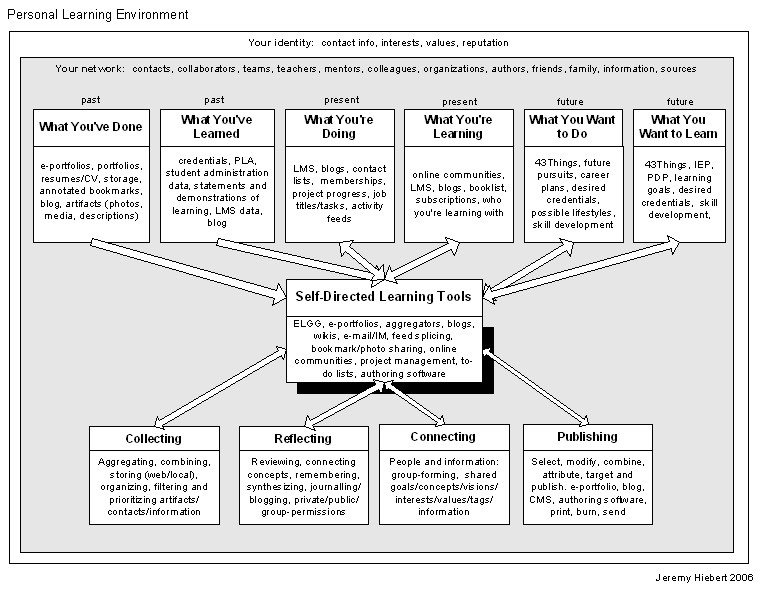
orking backwards to my original question what really is a PLE? I've got the general idea that it currently seems to be more of a concept then one simple thing. It is different for different people and is a collection of learning pieces, tools and experiences. Anything that assists or furthers you in learning is actually a part of your PLE. There doesn't seem to be one particular tool or formula that would be right for every person.
I found a diagram by Jeremy Hiebert that "works" for me in helping to visualize the whole idea. It's from Feb. 2006, so maybe there is something better that I haven't stumbled on yet.
It's really interesting to see a concept/tool being discussed and developed. I've never experienced anything like this and to read around through various posts discussing the notion is fascinating. One person comes up with one idea, another gives it a name, someone else draws a diagram. I'm excited to see where the topic will be in a year from now.
If I've misunderstood the terms I'd love to be corrected or pointed in a better direction (even if that is 1.0 of me).
Okay, so I read all these posts and I think I get it all, but maybe not. I need to rewind and try to find some info on what the heck a PLE really is. Then I find I need to know what a PKM is and some kind of new whale species called (I joke, I kind of like the sound of it) a p-Whale (PWLE).
So PKM (Personal Knowledge Management) I found nicely from Knowledgeboard via Tony Karrer as:
"PKM is a conceptual framework to organize and integrate information that we, as individuals, feel is important so that it becomes part of our personal knowledge base. It provides a strategy for transforming what might be random pieces of(Look I finally figured out how to create a block quote...neat)
information into something that can be systematically applied and that expands our personal knowledge."
A PWLE (Personal Work and Learning Environment) (pronounced p-Whale, a tentative term from Tony, but is cool, catchy and will probably stick) I also found on Tony's blog.
orking backwards to my original question what really is a PLE? I've got the general idea that it currently seems to be more of a concept then one simple thing. It is different for different people and is a collection of learning pieces, tools and experiences. Anything that assists or furthers you in learning is actually a part of your PLE. There doesn't seem to be one particular tool or formula that would be right for every person.
I found a diagram by Jeremy Hiebert that "works" for me in helping to visualize the whole idea. It's from Feb. 2006, so maybe there is something better that I haven't stumbled on yet.
It's really interesting to see a concept/tool being discussed and developed. I've never experienced anything like this and to read around through various posts discussing the notion is fascinating. One person comes up with one idea, another gives it a name, someone else draws a diagram. I'm excited to see where the topic will be in a year from now.
If I've misunderstood the terms I'd love to be corrected or pointed in a better direction (even if that is 1.0 of me).
Wednesday, 6 June 2007
The Power of the Internet, Satellites and Knowledge - Changing the World
Scanning through my feeds today I came across a post about Eyes on Darfur. Sure I've heard the name mentioned several times on the news here and there, but knowing there are so many tradgedies and in justices in this world I probably filed under....who knows, probably "ignorance" or "not today please".
Today instead I read the post. I went to the site and I really took some time to look through it and find out what it was all about. Amnesty International is using the power of the internet to update (sometimes daily) satellite images of violence torn Darfur villages. Did you know 200,000+ people have been killed; 2 million+ have been displaced; murder, rape, abduction, forced displacement happens regularly. I didn't.
I'm by far no political activist and I don't know much more then the headlines about what is going on in the world. But this really caught my eye today. What a great idea! Amnesty is using the power of the internet, satellites and the world's thirst for knowledge.
From the site:
"Amnesty International USA has identified 12 towns and villages in Darfur and eastern Chad that are at risk of attack by Janjawid militia, the Sudanese government, and/or armed opposition groups. Using satellite technology, AIUSA is closely monitoring these sites – and others in the region. Action must be taken now to prevent these sites from joining the long list of towns and villages utterly destroyed in Darfur and eastern Chad. Tell Sudanese President al-Bashir the world is watching – that we will know if harm comes to these civilians – and ask him to take all necessary steps to prevent attacks on these sites."
If you don't sign the petition or send off an email from the site, at least take a few minutes to look at the information, the before and after photos, and what they are trying to fix here. We really should all be informed about what is going on in our world and be impressed at the measures we can each take to try to help.
Today instead I read the post. I went to the site and I really took some time to look through it and find out what it was all about. Amnesty International is using the power of the internet to update (sometimes daily) satellite images of violence torn Darfur villages. Did you know 200,000+ people have been killed; 2 million+ have been displaced; murder, rape, abduction, forced displacement happens regularly. I didn't.
I'm by far no political activist and I don't know much more then the headlines about what is going on in the world. But this really caught my eye today. What a great idea! Amnesty is using the power of the internet, satellites and the world's thirst for knowledge.
From the site:
"Amnesty International USA has identified 12 towns and villages in Darfur and eastern Chad that are at risk of attack by Janjawid militia, the Sudanese government, and/or armed opposition groups. Using satellite technology, AIUSA is closely monitoring these sites – and others in the region. Action must be taken now to prevent these sites from joining the long list of towns and villages utterly destroyed in Darfur and eastern Chad. Tell Sudanese President al-Bashir the world is watching – that we will know if harm comes to these civilians – and ask him to take all necessary steps to prevent attacks on these sites."
If you don't sign the petition or send off an email from the site, at least take a few minutes to look at the information, the before and after photos, and what they are trying to fix here. We really should all be informed about what is going on in our world and be impressed at the measures we can each take to try to help.
Sunday, 3 June 2007
Hmmm, What to do with my 5000+ digital photos?
Thanks to a post Friday from Donald Clark I think I may shortly have some where to put all my 1000's of scenery photos to practical use.
Microsoft is working on perfecting it's Photosynth technology. Basically it takes photo collections that you, me and everyone else uploads and then relates them (links) them together to create real world environments. One can now walk through Notre Dame and see all elements of the structure as it truly exists.
I may have taken a picture of one statue and the next year someone takes a picture zoomed in of the statue, the next day another person takes a picture of the statue beside it. This software/platform will relate those photos together along with others to allow everyone to see them merged together as a "real" space.
How cool is that!?! Now I just need a better, faster, stronger computer to play with it.
Microsoft is working on perfecting it's Photosynth technology. Basically it takes photo collections that you, me and everyone else uploads and then relates them (links) them together to create real world environments. One can now walk through Notre Dame and see all elements of the structure as it truly exists.
I may have taken a picture of one statue and the next year someone takes a picture zoomed in of the statue, the next day another person takes a picture of the statue beside it. This software/platform will relate those photos together along with others to allow everyone to see them merged together as a "real" space.
How cool is that!?! Now I just need a better, faster, stronger computer to play with it.
- TED Ideas Worth Spreading Conference: Blaise Aguera y Arcas: Photosynth demo http://www.ted.com/index.php/talks/view/id/129
- Microsoft Live Labs - Photosynth: http://labs.live.com/photosynth/default.html
Subscribe to:
Posts (Atom)






 Posts
Posts